- Resources
Innovative Thinking


Usually because Google has not crawled the page yet, or because something on your own site is telling it not to index the page at all. The answer is in one place either way: a page not indexed in Search Console always carries a status, and the status names the cause. Seven statuses cover nearly every case on a small business site, and two of them ask nothing of you.
The report sits under Indexing → Pages. What follows is what each status is actually saying, how long to wait before treating silence as a fault, and the order to check things in. The cause we look at first on a freshly revamped site is in the fourth section, and it takes one click to undo.
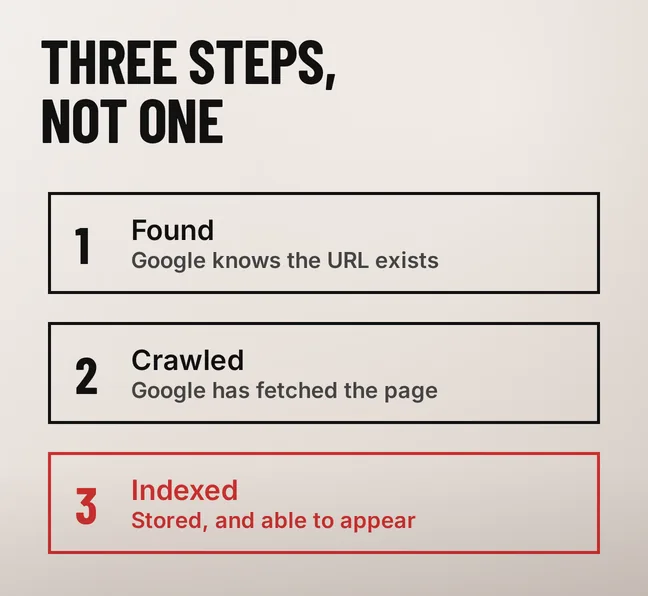
Google does three separate things with a page, and only the third one puts it in search results. It finds the URL, from a link or a sitemap. It crawls it, fetching the HTML the way a browser would. Then it decides whether to index it — store it and make it eligible to appear. A page can clear the first two steps and fail the third.
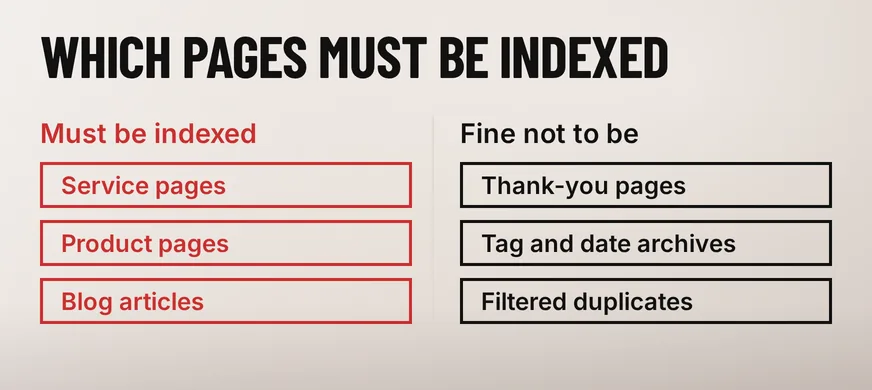
That is why the report sorts the statuses the way it does. Google’s Page indexing report documentation is blunt about the scope of the exercise: “Don’t expect every URL on your site to be indexed.” It then adds the part that matters: “all of your important pages should be indexed.”
A thank-you page, a tag archive and a filtered product URL sitting in the not-indexed list are the report working correctly. So read the list against your own page inventory before you read it as a problem. If your service pages, product pages and articles are in the index and the rest are not, nothing is wrong.
These two statuses sit next to each other in the report and point at opposite problems. Google’s wording for the first is “The page was found by Google, but not crawled yet.” For the second: “The page was crawled by Google but not indexed. It may or may not be indexed in the future.”
Discovered – currently not indexed means Googlebot has the URL and has not fetched it. The documentation says the crawl may have been rescheduled to avoid overloading the site, and Google’s crawl-budget guide is addressed to sites with a million or more pages, or ten thousand changing daily. On a fifteen-page business site the usual explanation is a thin path to the page: nothing on your own site links to it, and it exists only in the sitemap.
Crawled – currently not indexed means Google read the page and decided against storing it. That is a judgement about the page itself: too close to something you already have, or too little on it to deserve a separate entry. Search Console’s guidance for this status says there is “no need to resubmit this URL for crawling”, and that is the useful part — asking again does not change the judgement. Changing the page does.
A manufacturer in Shah Alam publishing forty product pages that differ by a model number and one row of a dimensions table will meet this status. The work is in the pages: one proper page per product family, with the variants on it, instead of forty near-copies competing with each other.
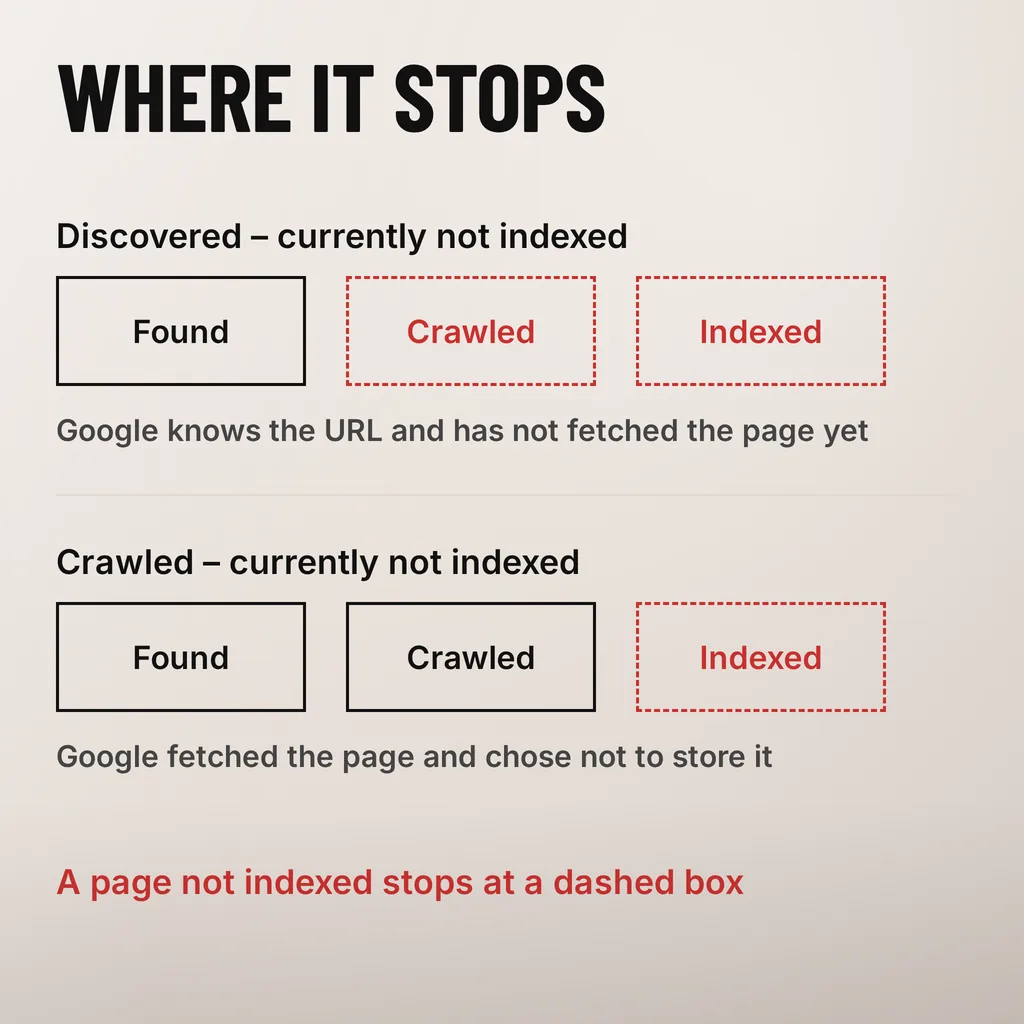
Google’s own wording for each status tells you what it is asking for, once you read it as an instruction rather than an error message.
| What the report says | What Google means by it | What it asks of you |
|---|---|---|
| Discovered – currently not indexed | Found, not yet crawled | Link to it from your own pages, then wait |
| Crawled – currently not indexed | Crawled, not stored; “may or may not be indexed in the future” | Make the page worth its own entry, or merge it |
| URL marked ‘noindex’ | Google “encountered a ‘noindex’ directive” | Remove the directive if the page should rank |
| URL blocked by robots.txt | “blocked by your site’s robots.txt file” | Unblock it if it should be indexed |
| Duplicate without user-selected canonical | “a duplicate of another page, although it doesn’t indicate a preferred canonical page” | Set the canonical, or merge the two pages |
| Alternate page with proper canonical tag | “correctly points to the canonical page, which is indexed” | Nothing |
| Page with redirect | “a non-canonical URL that redirects to another page” | Nothing |
The last two rows are what inflates the not-indexed count and worries people. Old URLs that now redirect keep appearing there for months after a revamp, and every one is the site behaving as designed. Google says the same of a correctly canonicalised duplicate: “there is nothing you need to do.”
This is the first thing we check when a newly launched site is invisible, because it is the easiest mistake to make and the hardest to see from the front end. WordPress has one checkbox under Settings → Reading, Search Engine Visibility, that adds a noindex directive to every page on the site. It belongs on a staging build, and it goes live more often than anyone admits.
Google’s documentation on blocking search indexing with noindex states the effect without hedging: “Google will drop that page entirely from Google Search results, regardless of whether other sites link to it.” No quantity of links, sitemap submissions or indexing requests overrides it.
There is a trap in the removal as well. If the page is also blocked in robots.txt, “the crawler will never see the noindex rule”, so a page can sit in the index while you believe you have removed it, or stay out of it while you believe you have let it back in. Unblock the page in robots.txt first, then let Google crawl it and read the directive.
Check it on the URL rather than in a settings screen: Search Console’s URL Inspection tool reports what Googlebot actually received. SEO plugins carry their own per-page noindex switch, themes sometimes add another, and a staging plugin can add a third, so the setting you remember ticking is not always the one doing it.
About a week for a new page on an established site, and longer for a brand-new site. Search Console’s documentation puts it at “a week or so for Google to start crawling and indexing a new page or site”, and warns that “Indexing is never instant, even when you submit a crawl request directly.”
After you fix something and click Validate Fix, the clock starts again: “Validation typically takes up to about two weeks, but in some cases can take much longer, so please be patient.” A page whose noindex you have just removed waits on the next crawl, and Google’s own note on that is that “it may take months for Googlebot to revisit a page” it has learned to visit rarely.
In our projects the pattern is consistent enough to plan a launch around: pages linked from the main navigation are usually indexed within days, and pages reachable only from the sitemap can sit in Discovered for weeks. How long before a new website starts showing up on Google covers the wider timeline, including why ranking takes considerably longer than indexing.
If a page clears all six and stays out of the index for a month, the honest reading is that Google does not think it earns its own entry. We have not found a way to argue with that other than changing what is on the page, usually by merging it into a stronger one.
It puts the URL into a priority crawl queue and does nothing beyond that. Google’s documentation says indexing is never instant even when you submit a crawl request directly, and for a page already crawled and not indexed it says there is no need to resubmit the URL. Use it once after a real change to the page, then leave it.
Not by itself. Redirected URLs, correctly canonicalised duplicates and pages you deliberately excluded all count toward it. Filter the list by status instead, and check whether any page you would spend money sending traffic to is in there.
It gets the URL discovered, which is the first of the three steps and not the one that decides anything. A URL that appears only in a sitemap, with nothing on the site linking to it, is the kind that sits in Discovered – currently not indexed the longest.
Two causes come up again and again in the indexing problems we are asked to look at: a directive left behind by a build, and pages that duplicate each other because the site structure grew without a plan. Both are repairs to a site worth keeping. Our SEO service starts at the Page indexing report, because it says which pages Google has actually accepted before anyone spends money on content or ads pointing at them.