- Resources
Innovative Thinking


Usually not one you need to build, and possibly not one you need at all. Google’s own documentation says a small site whose pages are all reachable through links from the home page may not need an XML sitemap, and a WordPress site has almost certainly published one already without anyone asking. The useful work is not making a sitemap. It is checking that yours lists the right pages, and reading what Search Console says about it.
It tells Google which URLs exist and when they last changed. Search Console’s help describes it as a file that tells Google which pages on your site it should know about, and Google’s page on submitting one calls submission merely a hint. A sitemap does not rank anything and does not force a crawl.
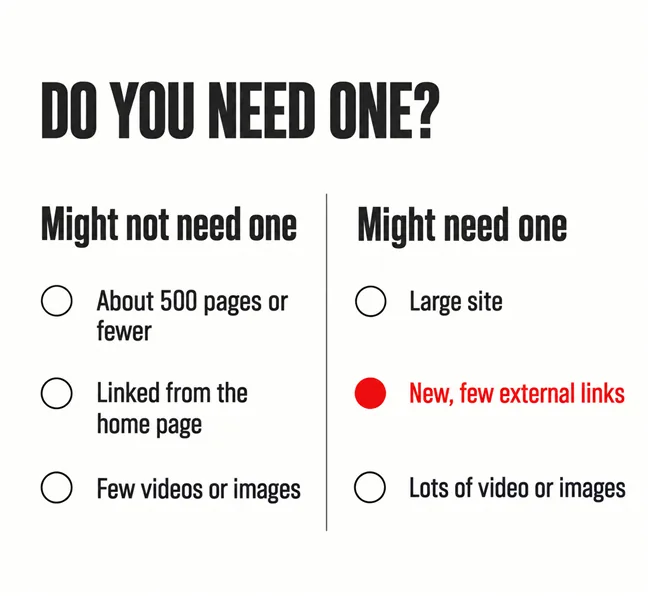
Google’s introduction, Learn about sitemaps, gives two lists. You might not need one if the site is small — “By small, we mean about 500 pages or fewer on your site” — comprehensively linked from the home page, and light on videos, images or news. You might need one if the site is large, carries a lot of rich media, or if “Your site is new and has few external links to it.”
Most Malaysian small business sites fall into both lists. A twenty-page site for a clinic or a contractor is small and well linked, which says skip it. It is also often new, or old with almost no other site linking to it, which says keep it. Google settles it in the same paragraph: “in most cases, your site will benefit from having a sitemap.” On WordPress it costs nothing, so keep it and stop worrying about it.
A sitemap tells Google a page exists. Links tell Google it matters.
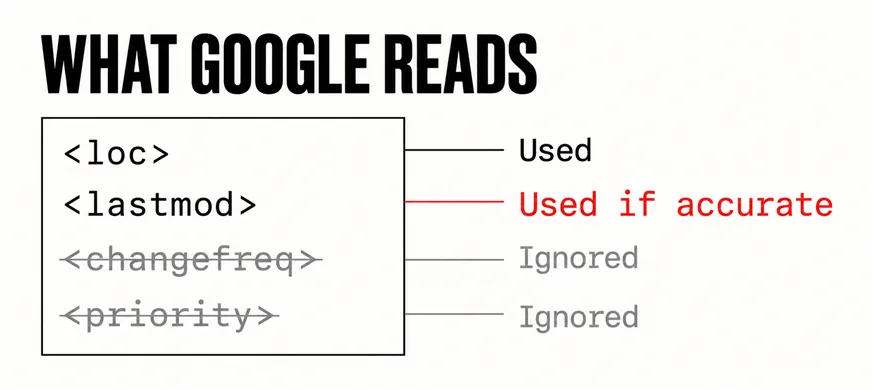
What it cannot do is rescue a page nothing links to, the argument in the sales page nobody can find, or hurry Google past its own judgement, which is why a new website takes time to show up either way. The fields that look like levers do not work either. The sitemaps.org protocol defines priority and changefreq, then notes that “All other tags are optional.” When Google retired the sitemap ping endpoint in 2023 it was blunter: “Google still doesn’t use the changefreq or priority elements at all.”
The one optional field Google does use is lastmod, the last-modified date, and only while it stays honest. If a page changed seven years ago but the sitemap says yesterday, the same post warns, “eventually we’re not going to believe you anymore”.
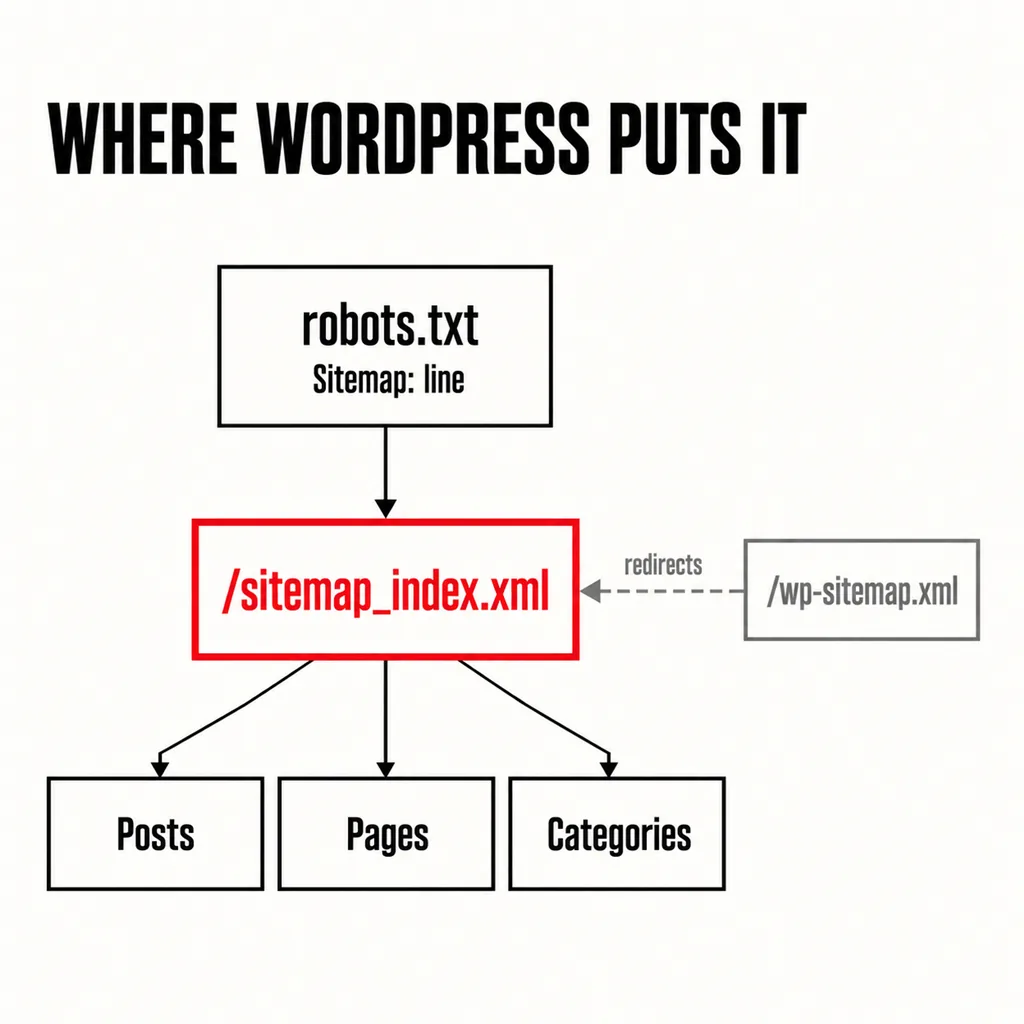
Almost certainly. Since version 5.5 in 2020, WordPress has generated its own: “WordPress will expose a sitemap index at /wp-sitemap.xml”, and its robots.txt points search engines to it. An SEO plugin moves the address rather than adding a second file. Rank Math and Yoast both publish /sitemap_index.xml, with one child sitemap each for posts, pages and categories. On this site the core address redirects permanently to Rank Math’s index: one sitemap, one address.
To check yours, open yourdomain.com/robots.txt and look for a line beginning Sitemap:, then open the address it gives. A list of further sitemaps, or of your own page addresses, means the file exists and is public. Two sitemap lines from two plugins is the first thing to fix: switch one generator off.
And unlearn one habit. Older guides still talk about “pinging Google” after each update. Google switched that endpoint off in 2023 and said code still using it “will also not do anything useful”.
Only pages you want someone to land on from a search. WordPress’s default is broad — “all public and publicly queryable post types and taxonomies, as well as for author archives” — and page-builder themes often store footers, mega menus and popups as posts of their own. Unless they are excluded, the sitemap lists them as if they were pages.
| Usually belongs | Usually leave out |
|---|---|
| Home, service and contact pages | Thank-you and form confirmation pages |
| Blog posts you would still stand behind | Theme parts: footer blocks, mega menus, popups |
| Project pages with real content | Author archives on a single-author site |
| Category pages that work as landing pages | Tag archives with one or two posts each |
In Rank Math each content type is switched in or out under the sitemap settings, and a page set to noindex drops out on its own. The wider clean-up — which pages should go entirely and listings that have sold — turns up the same pages. Treat plugin defaults here as you would star ratings on blog posts: somebody else’s guess about your site.
Submit the index address once in the Sitemaps report and read the status. Success means Google fetched and parsed the file. Has errors means some entries were faulty and the rest are still used. Couldn’t fetch means Google never got the file.
Discovered pages is the column people misread. It counts addresses parsed from the file, and the help page is explicit: “There is no guarantee that a page URL discovered in a sitemap has been or will be crawled or indexed by Google.” Twenty-five discovered is not twenty-five in search. For that, follow the sitemap’s row through to the Page indexing report filtered to it.
Removing a sitemap from the report does not withdraw it — “Google won’t forget the sitemap or any URLs listed in it” — and one that reads successfully does not need resubmitting each time you publish. Resubmit after a big change.
At three moments. At launch, when it is one of the items on the launch checklist that cannot be undone. After a redesign that changes URLs, when the sitemap and the redirects together decide whether rankings carry across, as in redesigning without losing SEO. And after a move of host or domain, where a sitemap stuck on Couldn’t fetch is often the first sign something was missed.
In between, a monthly glance is enough — status still Success, discovered count close to your real page count, indexed count not falling — and it belongs in a website care plan. If those are fine and pages still do not show, the sitemap was never the problem. Look at how the site is structured, or at whether your Business Profile is taking the searches instead.
Not strictly. Google can find it through the Sitemap line in robots.txt, and for a small, well-linked site Search Console’s help suggests simply requesting indexing of the home page. Submitting is still worth the minute: it is the only way to see the status and discovered counts.
The index. Search Console counts every URL in every child sitemap beneath it, and the plugin keeps the children current as you publish.
Checking a sitemap is the easy part. The work is deciding which pages deserve to be in it, then fixing the links and structure so Google has reasons to visit them. Our SEO service starts with that inventory on the site you already have — what is listed, what is indexed, what is linked — before anyone suggests rebuilding.