- Resources
Innovative Thinking


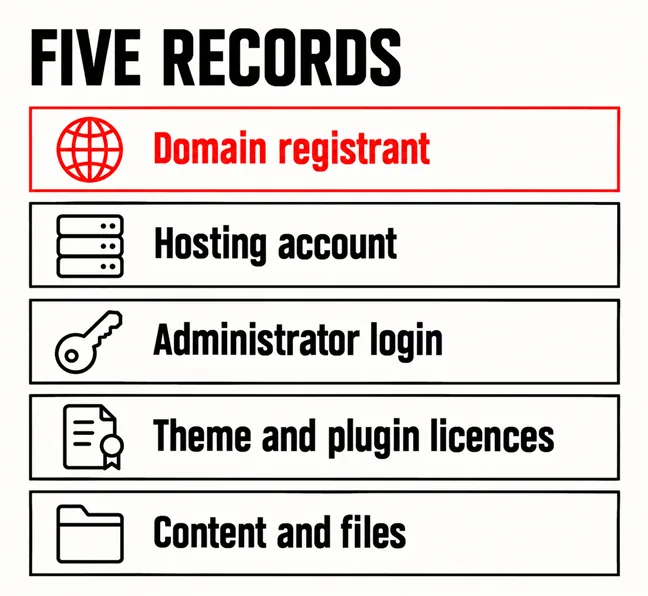
You own your website when your business’s name is on five separate records: the domain registration, the hosting account, the administrator login, the paid theme and plugin licences, and the files and content themselves. Website ownership is not a single certificate you either hold or do not. It is five records with five possible holders, and on many small business sites at least one of them still sits in the developer’s name or account.
That is rarely bad faith. It is convenience: the developer registered the domain under their own account, put the site on their reseller hosting and gave you an editor login. It becomes a problem when you change developer, revamp the site, or the developer stops answering. This article describes records and access, not legal rights; who owns the copyright in a commissioned design is a question for your agreement and a lawyer.
Five records, each kept somewhere different, each with its own question to ask.
| Record | Where it lives | The question to ask |
|---|---|---|
| Domain registrant | At the registrar | Is the registrant our company? |
| Hosting account | At the host | Is the account, and the bill, ours? |
| Administrator login | Inside the CMS | Do we have our own Administrator user? |
| Theme and plugin licences | At each vendor | Whose account bought them? |
| Content and files | On the server and in backups | Do we hold a recent copy? |
For each of the five, two things matter: whose name is on the record, and who holds the login to the account where it is managed. A domain can list your company as registrant inside a registrar account only your developer can sign in to, and then you cannot renew, move or repoint it without them. You need both.
Your name on the record says whose it is. The login decides who can act on it.
Add two records that sit beside the website: the Search Console property, covered below, and your Google Business Profile, which has its own owner roles and often outperforms the website it points to.
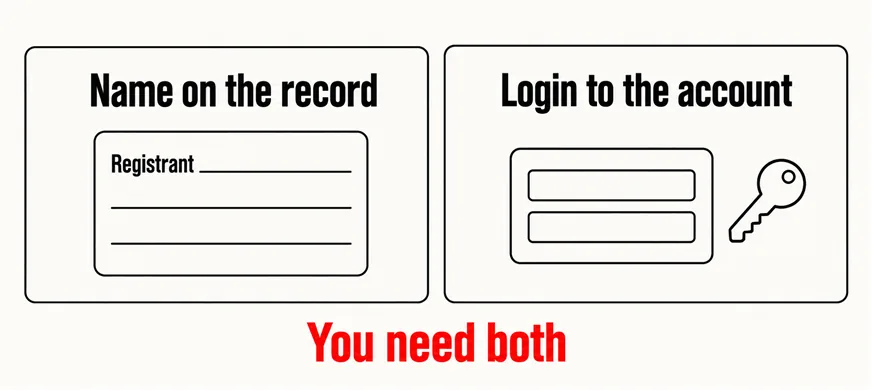
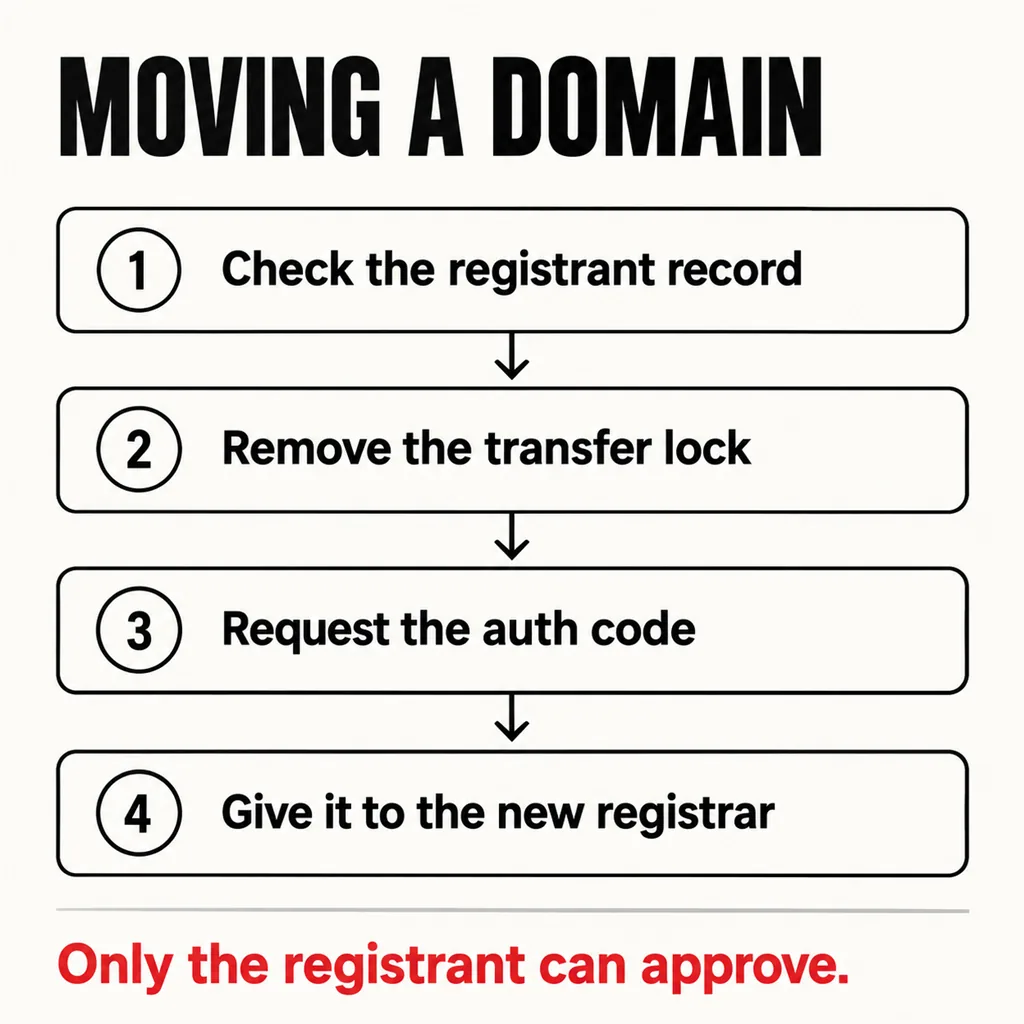
Check this first, because the domain is the record everything else points at. For .com and other generic domains, ICANN’s Transfer Policy is direct: “The Registered Name Holder is the only party that has the authority to approve or deny a transfer request.” If that holder is your developer, a transfer needs their approval, however long you have been paying the renewal invoice.
ICANN’s summary of registrants’ benefits and responsibilities puts the other side plainly: “You will assume sole responsibility for the registration and use of your domain name”, and “You must provide accurate information for publication in directories such as WHOIS, and promptly update this to reflect any changes.” The registrant is meant to be whoever actually uses the name.
For a .my address, MYNIC sets the rules. Its Registrant Policy defines the registrant as “the registered domain name holder of a .MY domain name”, and adds a line worth reading twice: “A domain name is based on subscription basis and is not absolutely owned by the Registrant.” Nobody owns a domain outright; the registrant holds the right to use it while it is renewed. A .com.my name is only open to applicants such as a company incorporated under the Companies Act or a business registered under the Registration of Businesses Act 1956, so the registrant should be your SSM-registered entity, not whoever filled in the form.
Ask whoever renews the domain for a screenshot of the registrant fields inside the registrar account; public lookups now often redact registrant details for privacy. If the registrant is right but the account is the developer’s, move the domain to a registrar account you control:
For .my, changing the registrant’s name, identification number, organisation details or email counts as a Change of Registrant under MYNIC’s policy, subject to verification and a new Registrant Agreement. Renewal dates belong on the same sheet; what should be in place before a website goes down covers what happens when one lapses.
Hosting is the commonest gap. Many small sites live inside a developer’s reseller account, which is fine while the relationship lasts; but you cannot download a backup, read an error log or move to a new host from an account you cannot sign in to. Can someone in your business sign in to the hosting control panel today, and is the invoice addressed to your company? If not, ask for your own account with the site moved into it, or a full backup of files and database delivered to you on a schedule.
Inside WordPress, the role that matters is Administrator, which the WordPress.org guide to roles and capabilities describes as “somebody who has access to all the administration features within a single site.” An Editor login lets you change pages but not install a plugin, add a user or remove one. Ask for your own Administrator user, in a named person’s email, rather than sharing the developer’s. Shared logins also fail a basic security check.
Search Console works the same way. Google’s help page on owners, users and permissions says an owner “Has full control over properties in Search Console”, and that if every verified owner is removed, the remaining users lose access after a grace period until someone verifies ownership again. Make sure a verified owner is someone in your business; the same applies to the analytics property, as setting up analytics properly explains.
Premium themes and plugins are usually licensed to whoever bought them, through an account at the vendor. If that was your developer’s account, the licence key on your site is theirs, and when they stop renewing it, the site usually keeps running but stops receiving updates, security fixes included. Where it matters, buy the licence in your own name; what a page builder costs after the build is largely this question.
Content is the record people assume they hold and often do not. You probably wrote the words; the photos may come from the developer’s stock subscription, and the logo, design source files and custom code may exist only on the developer’s laptop. Ask for the originals and the licence terms of any stock image; using your own photography removes that question.
Collect it before anyone touches the design, because a revamp is the moment a missing login turns into a week’s delay. In our projects, access is the first item on the brief, ahead of layouts.
None of this needs a confrontation. Asking in writing, politely, usually works and gives both sides a clean record. The full pre-revamp list is in the website revamp checklist, and a care plan should keep these records current once the work is done. Holding them is also what makes the choice in revamp or full rebuild a real one: you can only keep what you can get into.
Not by itself. A developer can manage DNS or renewals on your behalf. What matters is that the registrant record names your business and that someone in the business can sign in to the registrar account. Management can be delegated; the registrant record should not be.
Payment and the five records are separate things. Paying for the build does not change whose name is on the domain or whose account holds the hosting. Who owns the copyright in the design and code depends on your agreement, which is a question for a lawyer rather than a web team.
The registrant record is often hidden from public lookups for privacy, so visitors rarely see it. What visitors use to judge who is behind a business is the site itself, which is a separate question covered in who is behind your website.
Every revamp we take on starts with these five records, before design. Where something sits in a former developer’s account, we help the business ask for it, move it into accounts they control and write down where each one now lives. Our web development and design service hands over every login in the client’s own name at launch, because a site the owner cannot get into is not really theirs.