- Resources
Innovative Thinking


A website does not become less safe by being changed. It becomes less safe by sitting still while everything around it moves: new flaws published against plugins that were already installed, a certificate rule that changed in March, a breach law that took effect last year and gives you three days rather than three weeks. The website security checklist below is the once-a-year version of that review, and most of it has nothing to do with clicking Update.
Start by getting the threat right, because the wrong picture of it leads to the wrong spending. Almost nothing that reaches a small business site was aimed at that business, which is why company size has never had much to do with who gets hit.
Not a person sitting in front of your homepage. What a small site sees is scanning: software that already knows which plugin versions carry a published flaw, requesting the exact paths that would prove one is present, across thousands of sites an hour. The answer it is looking for is a version number.
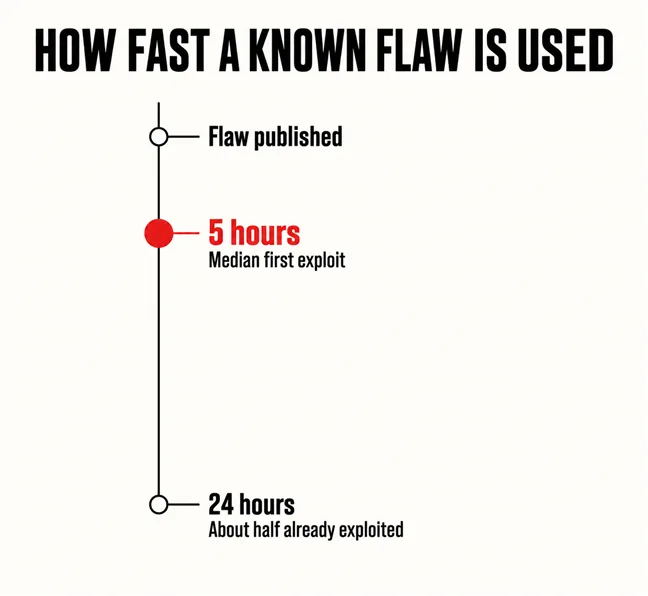
That changes how much time you have. Patchstack’s State of WordPress Security in 2026 measured the gap between a flaw becoming public and being attacked, weighted by how heavily each one was actually exploited: the weighted median time to first exploit is 5 hours, and approximately half of high-impact vulnerabilities are exploited within 24 hours. A patch released on Tuesday and applied at the end of the month was not applied late. It was applied in a different era.
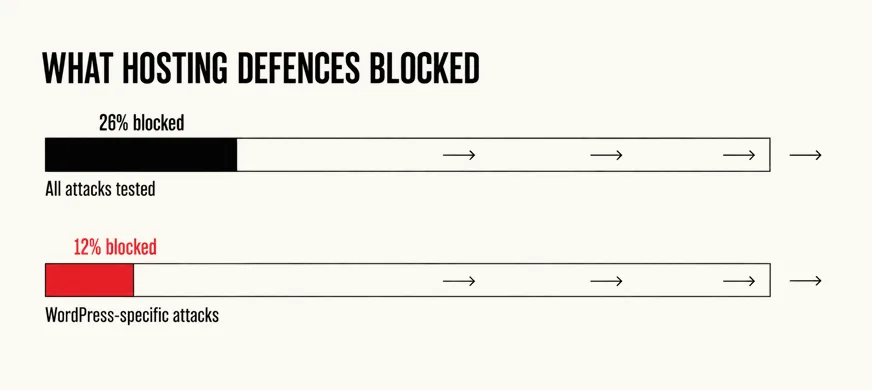
The second finding takes away the answer most owners give. Patchstack tested what hosting-level protection actually stops and reported that traditional defences only blocked 12% of WordPress-specific vulnerability attacks; across a broader set that included generic attacks, only 26% of total attacks were blocked. A firewall is worth having and not worth relying on, and “our host handles security” is a sentence with a number attached to it.
The industry’s own risk list has shifted the same way. The OWASP Top 10 was rewritten in 2025, and the categories that moved are the ones an assembled website is made of: Security Misconfiguration moved up from #5 in 2021 to #2 in 2025, and Software Supply Chain Failures arrived as a new entry at number three. One is a setting nobody revisited; the other is code written by somebody you have never met and installed in one click.
Nobody chose your website. Something scanned it, and the only question it asked was which version you are running.
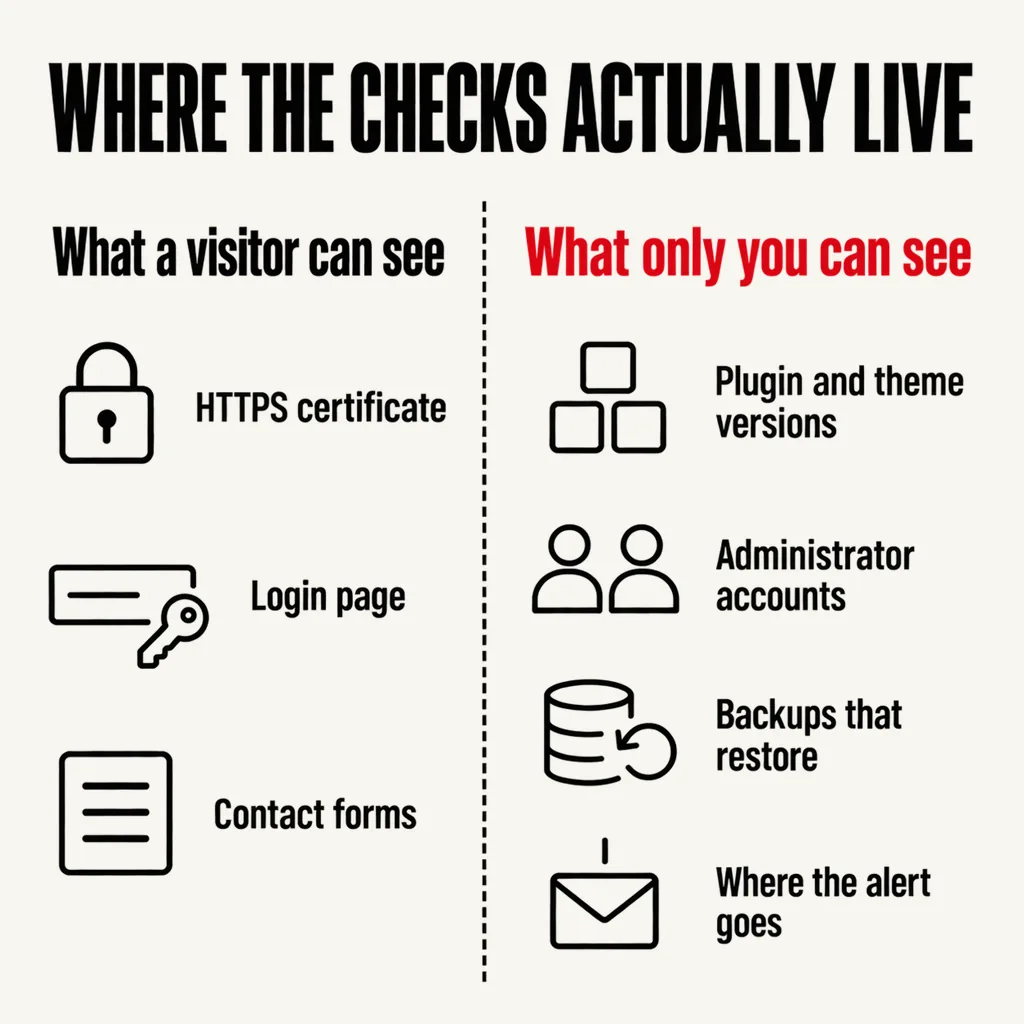
Three things on this list can be checked from the front of the site. The rest live in the admin area and on the server, where nothing looks wrong to a visitor and nothing looks wrong to you either, because absence does not announce itself.
None of that replaces upkeep between reviews: what a real maintenance plan covers is the month-to-month version of the same discipline. The annual check exists to catch what a monthly routine never looks at.
Both of these are dated, both apply to ordinary business websites in Malaysia, and neither shows up in any plugin’s update screen.
Certificates got shorter. Until March the maximum life of a public TLS certificate — the thing behind the padlock — was 398 days, which fitted a yearly renewal reminder. From 15 March 2026 the maximum is 200 days, falling to 100 days in March 2027 and 47 days in March 2029. If somebody renews the certificate by hand once a year, that routine has already stopped matching reality, and an expired certificate is the one security failure every visitor sees, in a full-page browser warning. The check is not the expiry date. It is whether renewal is automated at all.
Breaches acquired a clock. Since 1 June 2025, section 12B of the Personal Data Protection Act requires notification to the Commissioner within 72 hours of a personal data breach, with affected individuals told no later than seven days after that where the breach is likely to cause significant harm; failure to comply carries a fine of up to RM250,000, up to two years’ imprisonment, or both. The Department of Personal Data Protection publishes the data breach notification guidelines in full. The consequence for a website owner is unglamorous: you cannot answer a 72-hour question without server logs, a record of who had access, and a named person who knows the call is theirs.
A contact form that stores enquiries in the WordPress database is holding personal data, as is an order table, a newsletter list or a CV upload folder. That is most business websites.
The signs are rarely dramatic: pages you did not write appearing in a search for your own brand, visitors redirected but only on a phone, a run of 404s for URLs in a language you do not publish in. Google often notices before your customers do — pages or sites affected by a security issue can appear with a warning label in search results or an interstitial warning page — and the Security Issues report in Search Console explains what it found. If you find something, the order matters more than the speed.
No. The padlock says the connection between visitor and server is encrypted, which stops somebody on the same public wifi reading what is typed into your contact form. It says nothing about the software on the server, who holds an administrator account, or whether a plugin with a published flaw is installed. A compromised website keeps its padlock.
It helps, and it does not replace updating. A blocking tool has to recognise an attack to stop it; an applied patch removes the weakness the attack is aiming at. Use one for the visibility it gives you — login attempts, file changes, malware scans — and treat its alerts as something a person reads.
Not every incident, but the threshold is lower than most people assume. The obligation is triggered when a data controller has reason to believe a personal data breach has occurred, and affected individuals must be told as well where it is likely to cause significant harm. Decide in advance who makes that judgement and where the logs they would need are kept.
Most of the insecure sites we are shown are not neglected. They are sites that were built well, handed over, and then left in the care of nobody in particular. Our website development and maintenance service starts with the review above, written up as a list of what is exposed, what it would take to close, and what can honestly be left. If you have read this far and cannot say who holds the administrator accounts on your site, that is the place to begin.