- Resources
Innovative Thinking


When Google keeps showing the wrong page from your website — the old services page instead of the new one, a blog post instead of the page that sells, an address with a tracking code on the end — it is nearly always one of two problems. Either Google has decided two of your addresses are the same page and picked the one you did not want, or it sees two different pages and judges the other one the better answer to that search. Most advice on a google showing wrong page problem mixes the two, which is why so much of it fails: the fixes differ, and Search Console tells you which one you have in a couple of minutes.
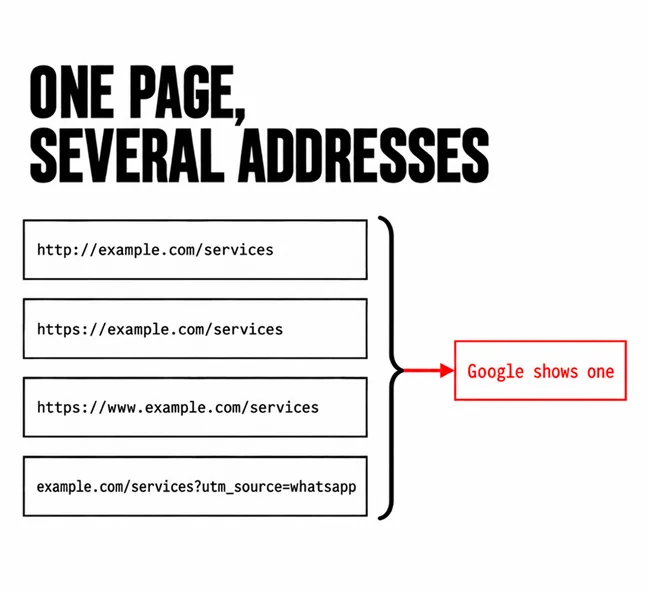
When several addresses serve the same or nearly the same content, Google groups them and shows one. Google’s documentation on canonicalisation puts it in one line: “Canonicalization is the process of selecting the representative –canonical– URL of a piece of content.” The rest of the group are treated as duplicates.
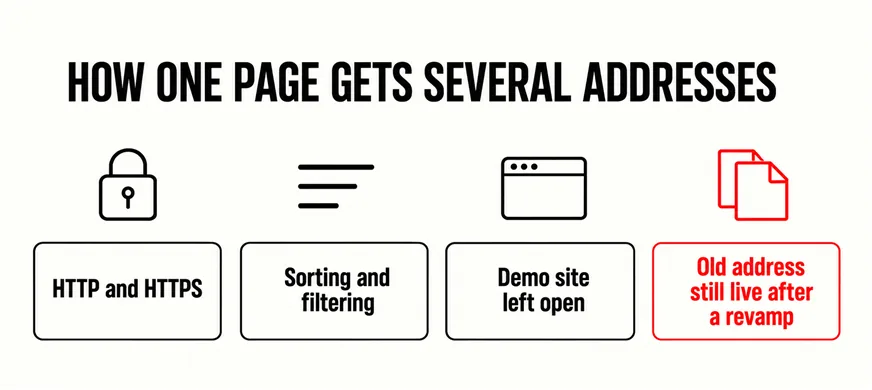
Nobody sets out to create them. Google’s list of causes includes “the HTTP and HTTPS versions of a site”, “the results of sorting and filtering functions of a category page” and “the demo version of the site is accidentally left accessible to crawlers”. After a revamp, add the old page address still answering beside its replacement. Add a WhatsApp campaign link with a tracking code, and one services page can be live at http://example.com/services, https://example.com/services, https://www.example.com/services and example.com/services?utm_source=whatsapp all at once.
Google then picks the version that is “objectively the most complete and useful for search users”, weighing redirects, HTTPS, sitemap entries and any canonical tag you set. Your tag counts, but the documentation is plain about its weight: “indicating a canonical preference is a hint, not a rule.” That is where the wrong page comes from. Google has not ignored you; it has found your other signals louder than your hint.
It is not a penalty: “Some duplicate content on a site is normal and it’s not a violation of Google’s spam policies.” The cost is quieter. The address Google picked is the one people see and click, and the page you improved sits in the group, out of sight.
Open Search Console, paste the address you expected into the inspection bar, and read the indexed result. Google’s guide to fixing canonicalisation issues starts at exactly this step: “Use the URL Inspection tool to check which page Google considers canonical”.
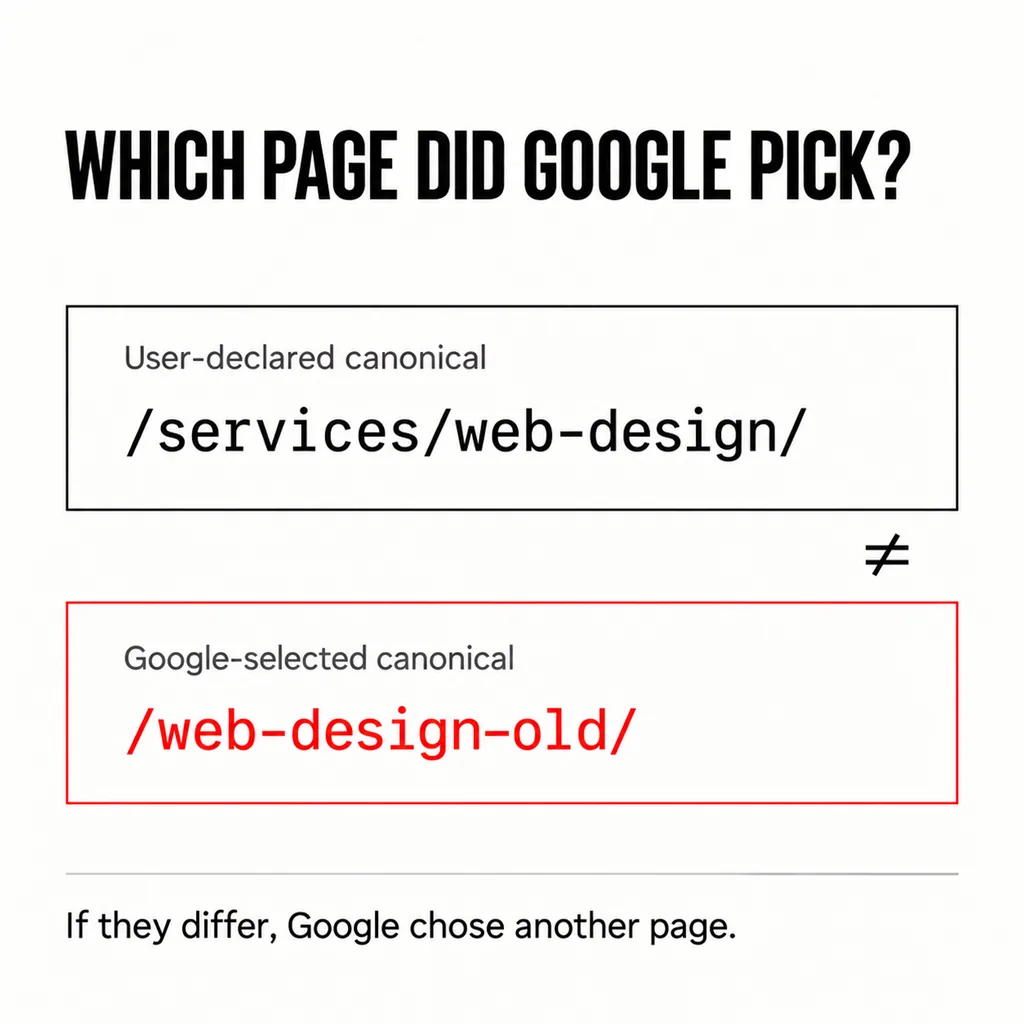
Two fields under Page indexing matter, and the URL Inspection help page defines both. User-declared canonical: “If your page explicitly declares a canonical URL, it will be shown here.” Google-selected canonical: “The page that Google selected as the canonical (authoritative) URL when it found similar pages on your site.” If your page declares /services/web-design/ and Google has selected /web-design-old/, you have a duplicate problem. If the two match, you do not, and the next section is yours. Use the indexed result rather than the live test, which “cannot predict whether or not the tested version will be considered canonical.”
To find every affected page at once, open the Page indexing report. “Duplicate, Google chose different canonical than user” means “This page is marked as canonical for a set of pages, but Google thinks another URL makes a better canonical.” “Duplicate without user-selected canonical” is the same on a page that never stated a preference. A long list under either means your site is publishing one page at many addresses.
Then it is two different pages competing for one search, usually a blog post written around a keyword that now outranks the service page. Inspection shows each as its own canonical, and nothing is technically wrong.
Confirm it in the Performance report: filter by the search term and open the Pages tab. If two of your pages share the impressions, Google is choosing between them search by search. That is keyword cannibalisation, and the fix is editorial. Decide which page owns the search and make it the fullest answer. Rewrite the other for a different question, or merge and redirect it, as in deciding which pages should go. Then point internal links at the owner with anchors that say what it is: the page that sells web design is the one your menu, footer and posts call “web design”.
Structure, not content is usually where the confusion starts, and the sales page nobody can find is often the one that lost. It is also how a competitor with a worse website outranks you: one page per subject, and every link agreeing which.
First, check whether Google is right. The troubleshooting guide asks you to “think about whether the Google-selected canonical makes more sense than your preferred canonical URL for your users coming from Google Search”. If its pick is the HTTPS version, the fuller one, the one everything links to, make it your canonical too.
If yours is right, make every signal agree. Google’s guide to consolidating duplicate URLs ranks the methods by strength, and they stack:
| Signal | What Google calls it | Use it for |
|---|---|---|
| 301 redirect | “A strong signal that the target of the redirect should become canonical.” | Old addresses nobody needs |
| Canonical tag | “A strong signal that the specified URL should become canonical.” | Tracked or filtered versions that must stay live |
| Sitemap entry | “A weak signal that helps the URLs that are included in a sitemap become canonical.” | Listing only the addresses you want shown |
| Internal links | “Linking consistently to the URL that you consider to be canonical helps Google understand your preference.” | Menus, footers, buttons, posts |
The same guide rules out three moves that feel like fixes. Not robots.txt: “Don’t use the robots.txt file for canonicalization purposes.” Not the removal tool: “It hides all versions of a URL from Search.” Not noindex, which “will completely block the page from Search”. And never two different canonicals for one page by two methods; on WordPress, a theme and an SEO plugin each writing a tag is one way that happens.
Then wait. Even after you make the pages clearly different, Google “might hold pages in a duplicate cluster for up to two weeks”. Request indexing once for the page that matters; the feature has quotas, so “reserve it for your most important URLs”.
Because a revamp is when a site briefly owns two versions of almost everything. The new services page goes live at a new address, the old one keeps answering, and the old one has years of links behind it. The leftovers we check first:
A crawl before launch, alongside the other pre-launch checks, catches most of these. A URL Inspection of your five most important pages two weeks after launch catches the rest. For a brand-new site, how long ranking takes is the likelier question.
No. Google says some duplicate content is normal and not a breach of its spam policies. The cost is which version gets shown, not a penalty, though the version shown may be the one you stopped maintaining.
There is no fixed time. For content changes, Google says pages can stay grouped as duplicates for up to two weeks. Check URL Inspection again after a fortnight before changing anything else, so you can tell which change worked.
On a revamp, we write the address map — every old URL and where it now points — before the new design is built, and inspect the key pages a fortnight after launch. If Google is already showing the wrong page from your site, our SEO service starts with the two Search Console checks above and fixes what they find, without a rebuild.