- Resources
Innovative Thinking


You know a revamp worked when the numbers it was meant to move have moved — measured against a baseline recorded before launch, over a window that is fair to both versions of the site, and only once the new site has had time to settle. Judged that way, website revamp results come down to three readings: enquiries from Google Analytics key events, search clicks and impressions from Search Console, and Core Web Vitals from real visitors.
Most owners judge launch week instead, which is the least reliable week the site will ever have. Below: what to write down before launch, which dates make a fair comparison in Malaysia, when each reading is ready, and which early wobbles to leave alone.
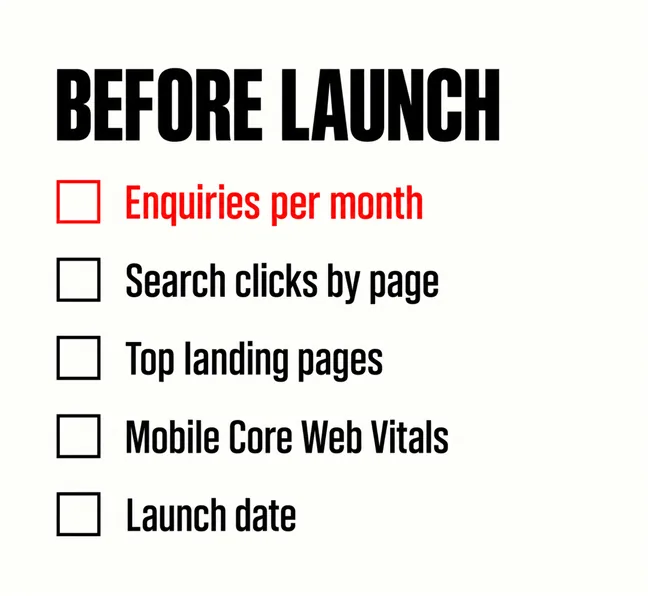
Anything you want to compare afterwards, recorded while the old site is still live. It is the step most revamps skip, because the old site feels like the thing being thrown away; it is also the only evidence of where you started.
If none of this exists yet, the minimum analytics setup comes first, weeks before launch. Google’s Analytics Help notes that “the data retention setting only affects explorations and funnel reports” — exactly the reports a detailed before-and-after uses — so choose the longer retention before old data ages out.
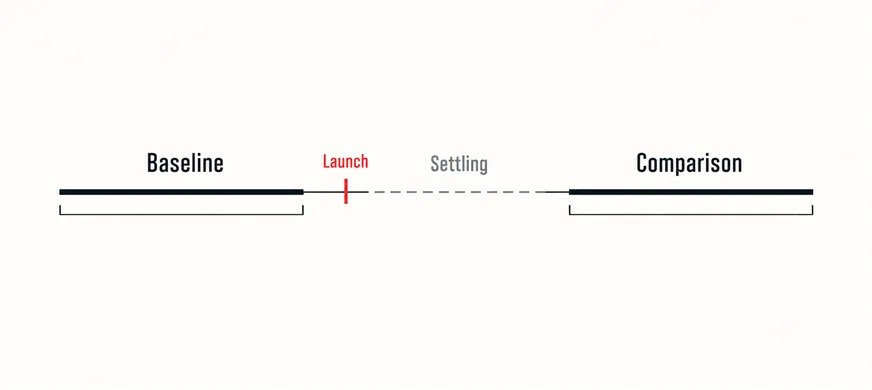
Then fix the windows while nobody is attached to the result: a baseline before launch, a settling period after it that nobody judges, and a comparison period the same length as the baseline. Written into the revamp brief, they mean agency and business mark the work against the same dates.
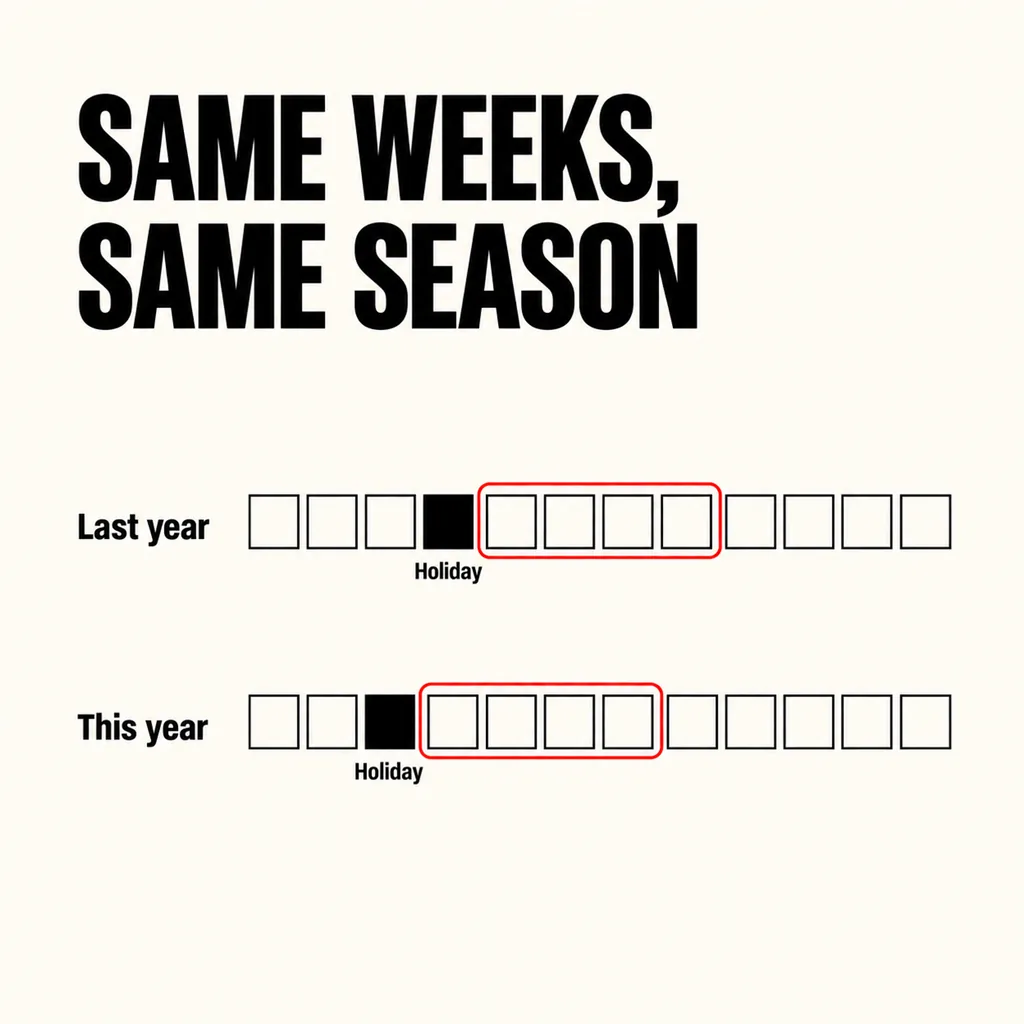
The same weeks of the season, a year apart, wherever the history exists. Comparing the month after launch with the month before is the commonest mistake, because the Malaysian calendar does not stand still. Hari Raya Aidilfitri arrives ten or eleven days earlier every year, Chinese New Year can fall anywhere from late January to late February, and school holidays change demand for everything from tuition to aircon servicing. A revamp launched just after Raya looks like a triumph against the quiet weeks before it; one launched into a school holiday can look like a failure for reasons unrelated to the site.
Search Console makes the like-for-like version easy. Its help page on filtering and comparison in the Performance report explains that when you compare two date ranges, “the results table will display a Difference column”, row by row for each page or query. It also recommends weekly or monthly views, because “aggregating by week or month neutralizes the ‘day-of-the-week’ effect” — a Saturday set against a Monday tells you nothing.
If ads started the same month, separate channels in Analytics, or the revamp takes credit, or blame, for the ads.
Enquiries first, search second, speed third. A faster, better-ranking site that produces no more enquiries has improved the inputs, not the result.
| Reading | Where | When it is fair to judge |
|---|---|---|
| Enquiries (key events) | Google Analytics | After a full comparison window, against the same weeks before |
| Search clicks and impressions by page | Search Console, Performance, Compare | After the settling period, week against week |
| Core Web Vitals, mobile | PageSpeed Insights field data | Once 28 days have passed since launch |
Google’s Analytics Help defines a key event as “an event that measures an action that’s particularly important to the success of your business.” Compare monthly counts, then key events by landing page: enquiries moving from the home page to service pages is often the revamp working, even when the total looks flat. Small numbers need care — twelve against nine is not yet a trend — and the inbox count is the cross-check. If counts rise but work does not follow, look at what happens after the form is submitted.
Compare clicks and impressions page by page. Impressions up with clicks flat usually means titles are not earning the click, or an answer box is taking it, as zero-click search explains. A page whose impressions collapsed is a redirect or indexing fault to fix, not a trend to wait out.
Lab scores change the minute the site launches. The figure that counts, from real visitors on real phones, does not. PageSpeed Insights reports field data from real users “over the previous 28-day collection period”, so for four weeks after launch that figure still blends in visitors of the old site. Read it once the whole window belongs to the new site; whether three seconds is still fast enough explains the thresholds for a mid-range phone on 4G.
Ranking movement, mostly. Google’s Search Central guidance on site moves says plainly: “With any significant change to a site, you may experience ranking fluctuations while Google recrawls and reindexes your site.” Where addresses changed, it adds that a medium-sized site can take a few weeks or more before Google is showing the new URLs. A dip in the first fortnight is the expected cost of a revamp, not a verdict; redesigning without losing rankings covers the monitoring, and how long ranking takes the wider expectation.
Also leave alone: the newest data in Search Console, which its help pages describe as preliminary and still being collected; a lab speed score that differs from the field data; and one slow week in a holiday period.
These justify acting the same day:
Rebuild what you can. Search Console usually still holds the months before launch even if nobody looked at them, so search clicks by page can often still be compared, and standard Analytics reports keep their counts if the tag was working. Enquiries can be counted from the inbox, the WhatsApp Business chats and the call log for the same weeks last year — slower, but real.
What cannot be rebuilt is the old site’s field speed data once its 28-day window has rolled past, or a key event nobody defined. Judge on enquiries and search, and start the next baseline now. If the answer is that traffic is up and enquiries are not, why visitors come and nobody contacts you and auditing a landing page without guessing are where to go next.
Long enough for a settling period plus a comparison window as long as your baseline — for most small sites, enquiries and search after the second month, and field speed data once 28 days have passed.
Probably, if the window is fair. A revamp that removed thin pages or stopped attracting the wrong visitors can lose visits and gain enquiries. If the pages that lost traffic never produced an enquiry, the loss is not a problem.
We record the baseline before a revamp starts and agree the comparison dates with the client before launch, so the before-and-after is a measurement rather than a feeling. Our web development and design service includes that setup, and how long a revamp takes explains where the settling period sits in the schedule. If you are still deciding whether the site needs a revamp at all, revamp or full rebuild is the place to start.