- Resources
Innovative Thinking



Sometimes, and you can find out which in about ten minutes. Slow website hosting shows up in one specific number: how long the server takes to send back the first byte of the page. If that wait is long, the hosting, or what the hosting is being asked to do on every visit, is the problem, and moving to a better plan can help. If the first byte arrives quickly and the page still drags, the page itself is the fault, and a bigger plan will not change it.
Hosting is the easiest thing to blame because it is a line on an invoice that can be upgraded. This article shows how to tell the two problems apart, the four server-side causes we see most on Malaysian business sites, and when paying for more hosting is the right call.
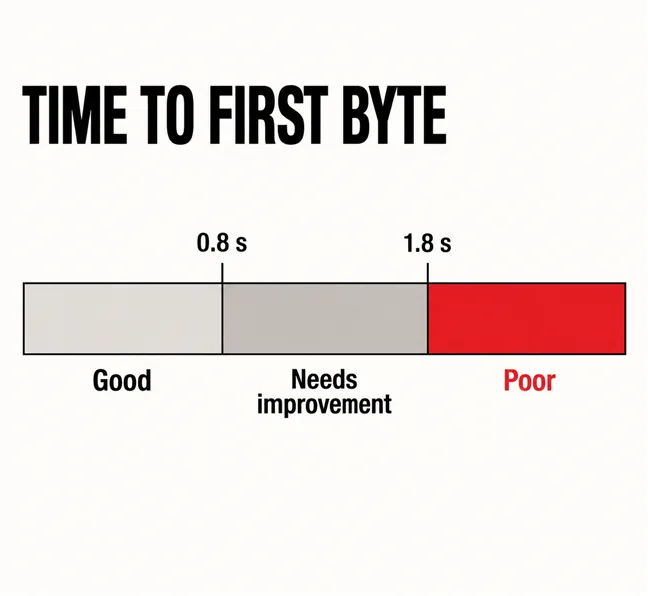
Look at Time to First Byte, usually shortened to TTFB. It is the time between a visitor asking for your page and the first byte of the reply arriving, before a single image, font or script has started loading. web.dev’s article on Time to First Byte puts the line plainly: “Good TTFB values are 0.8 seconds or less, and poor values are greater than 1.8 seconds.”
The same article lists what sits inside that number: redirects, DNS lookup, setting up the connection and its encryption, and the server preparing the response. On a WordPress site, the part that grows is the last: the server running PHP and querying the database to build the page.
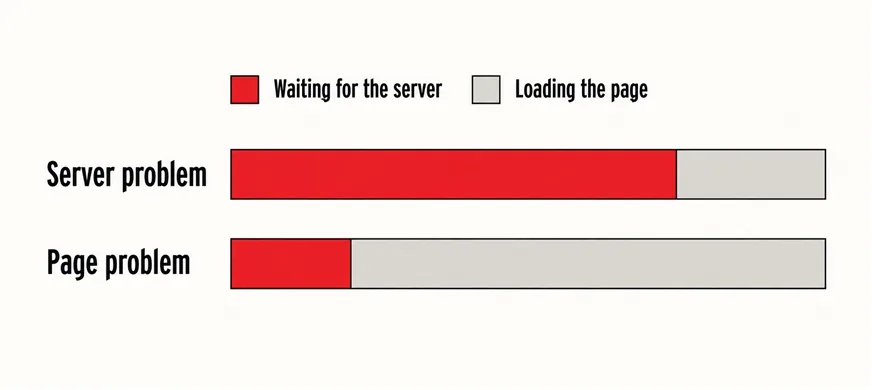
Then compare TTFB with the whole load. A first byte that takes two seconds has spent most of the budget before the browser could do anything, and no image compression recovers that. A first byte in 0.3 seconds on a page that still takes five to show its main content is a page problem: heavy images, a background video, a page builder loading more than it needs.
If the first byte is slow, look at the server. If the first byte is fast and the page is slow, look at the page.
Two places give you the number. PageSpeed Insights shows TTFB in its field data when your site has enough traffic to appear in the Chrome UX Report, which Google describes as a dataset that “reflects how real-world Chrome users experience popular destinations on the web”. Smaller sites will not have enough visitors to appear there. For them, open the page in Chrome, press F12, choose the Network tab, reload, click the first request and read “Waiting for server response” under Timing. Repeat it on several pages and at different times of day.
One caution: TTFB is not one of the Core Web Vitals. web.dev says so directly, so a poor TTFB is a diagnosis rather than a score Google grades you on. Its weight comes from what it does to the measures that are graded, which what counts as a good load time now explains.
In the slow sites we are asked to look at, a long TTFB almost always comes from one of four causes. Only one of them is fixed by paying the host more.
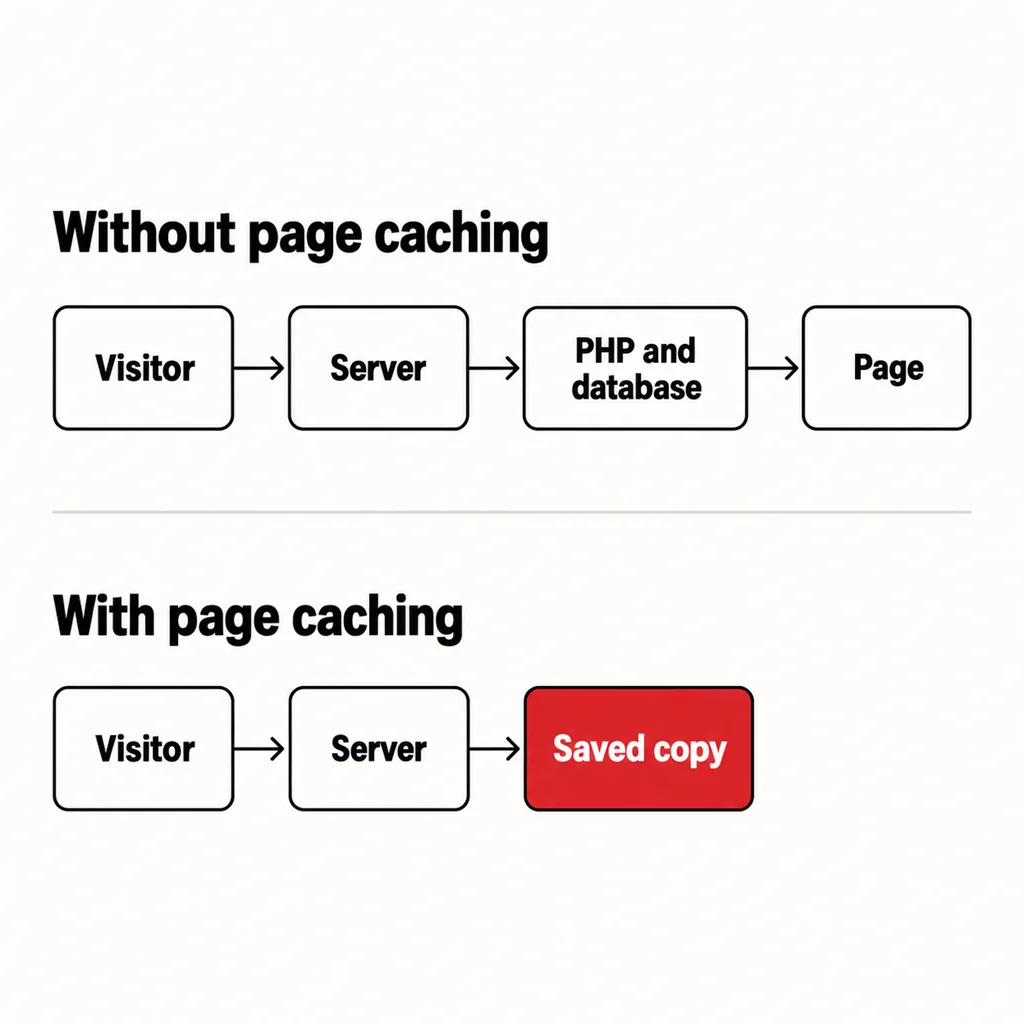
Without a page cache, WordPress builds every page from scratch for every visitor: PHP runs, the database is queried, the theme assembles the result. With a page cache, the server saves the finished page once and sends that copy to everyone after. On a brochure site that changes a few times a month, a missing cache is the commonest cause of a slow first byte, and it is fixed with a plugin or a hosting-panel setting rather than a new plan.
PHP is the language WordPress runs on, and your host lets you choose which version. PHP.net’s supported versions page shows that as of October 2026 only 8.4 and 8.5 are in active support, 8.2 receives security fixes only until 31 December 2026, and anything older has reached end of life, where “users of this release should upgrade as soon as possible, as they may be exposed to unpatched security vulnerabilities.” WordPress.org’s own requirements page recommends “PHP version 8.3 or greater”.
You can see your version in WordPress under Tools, then Site Health, then Info, under Server. Newer versions usually run WordPress more efficiently, though how much depends on the site, so the stronger reason to upgrade is security. Test on a staging copy first: an old plugin that breaks on a new PHP version is the commonest snag, and it is one of the security checks worth doing this year anyway.
Some plugins query the database or call an outside service on every page load: related-post widgets, visitor counters, poorly built filters. A cache hides some of this; logged-in users and checkout pages bypass it and feel all of it. This is where a site becoming expensive to maintain first shows up as slowness.
On shared hosting, your site shares a machine with many others and is capped on processor time and memory. When a neighbour gets busy, or your own traffic spikes, requests queue. The signs are distinctive: TTFB that is fine at 7am and poor at 9pm, a WordPress dashboard that crawls, and occasional “508 Resource Limit Is Reached” or 503 errors. This is the case where a better plan genuinely helps.
Yes, more than most people expect, because distance is paid on several of the steps inside TTFB rather than once. Looking up the address, opening the connection and agreeing the encryption each involve messages travelling to the server and back before the page is even requested. A site hosted in the United States or Europe makes every Malaysian visitor pay that round trip several times over.
If your customers are in Malaysia, the server should be in Malaysia or Singapore. Some budget plans default to a data centre on another continent, so check the region in your hosting panel or ask the host. Who controls that panel matters too; who actually owns your hosting account is worth settling before anything is moved.
A content delivery network serves copies of images, scripts and, when set up for it, whole pages from locations near the visitor. It does not fix a slow server for pages it cannot cache, such as carts, accounts and forms, so treat it as an addition to sensible hosting rather than a replacement.
| What you measure | Likely cause | What actually helps |
|---|---|---|
| TTFB poor on every page, all day | No page cache, or an old PHP version | Turn on caching, update PHP; the plan may be fine |
| TTFB fine early, poor at busy hours | Shared server at its limits | A better plan or a less crowded host |
| TTFB poor for visitors, fine near the server | Server on another continent | Move to a Malaysian or Singapore region |
| TTFB fine, page still slow | Page weight: images, video, scripts | Fix the page; hosting will not change it |
The last row is the most common, and the one where money is most often wasted on hosting. Start with images, which slow every page, then any homepage video background, then the page builder’s own weight.
If an upgrade or a move to a new host is the answer, plan it rather than clicking “migrate” on a Friday afternoon; moving to a new host without breaking it covers the order of work, and what to have in place if the site goes down covers the safety net.
Most of these are part of routine upkeep rather than one-off fixes, which is why they belong in a proper website care plan and in maintenance that goes beyond plugin updates. If all five are fine and the first byte is still slow, the hosting plan is the limit, and paying for a better one is money well spent.
Only if the server is the bottleneck. If your Time to First Byte is already under 0.8 seconds, a bigger plan will barely change what visitors feel, because the delay is in the page. Measure first; upgrade when the first byte is slow and caching and PHP are already sorted.
No. A well-run shared plan with page caching, a current PHP version and a nearby data centre serves a typical brochure site comfortably. It struggles with busy online stores, heavy logged-in use, or a host that packs too many sites onto one machine.
No. It shortens the distance for files and pages it can cache, but anything personal, such as a cart, a login or a form, still goes back to your server. A CDN on top of slow hosting makes some pages faster and leaves the important ones slow.
On a slow site we measure the first byte before touching the design, because it decides whether the fix is hosting, caching or the pages themselves. Often it is the last, and that is a revamp rather than a full rebuild. Our web development and design service covers both halves: getting the server answering quickly, and making the page worth waiting for.