- Resources
Innovative Thinking


As often as you would hate to redo the work. A site that takes orders or enquiries needs a website backup every day, because a day is how much typing, ordering and enquiring you would be asking people to repeat. A brochure site edited a few times a year is fine on a monthly copy. The question is not how big the business is; it is how much your site writes down between one copy and the next.
Frequency is the easy half, and it is the half most owners already half-solved by ticking a box in a plugin. The copies that fail are the ones sitting on the same server as the site, and the ones nobody has ever restored.
Set it by what the site records, not by what it looks like. WordPress’s own documentation on backups gives two plain lines: “For smaller websites with fewer posts, backups should be made once a week”, and “For high-activity websites with a lot of posts, backups should be made daily.” The same page adds the rule that gets forgotten between schedules: “Back up your database regularly, and always before an upgrade.”
Translate “high-activity” into something you can check. Visitors alone change nothing. What changes the database is a form submission, a booking, an order, a product edit, a new post, a review, a comment. A café site with four thousand visitors a day and a phone number on it writes almost nothing down. A supplier site with a quotation form collects something every afternoon that exists nowhere else once it is gone.
That distinction matters locally, because a lot of Malaysian enquiry traffic never touches the site at all. A WhatsApp enquiry lives in your phone and survives any server failure. A web form enquiry lives only in your database, and it is gone with it.
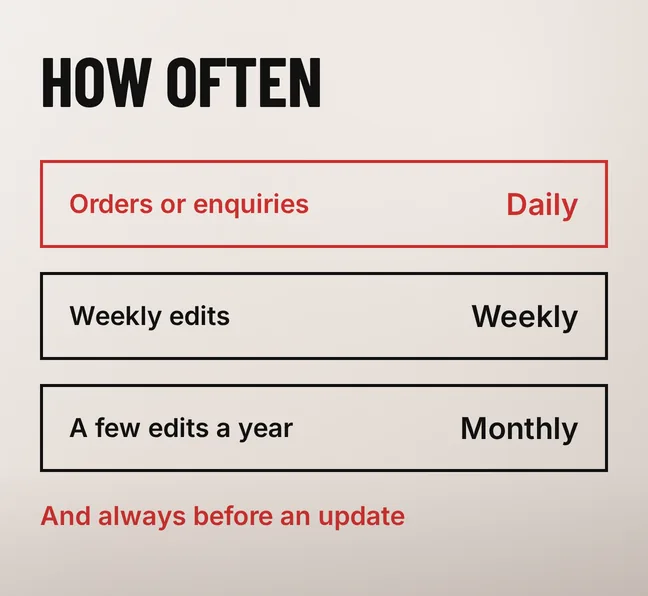
| What your site records | How often to back up | What a failure costs you |
|---|---|---|
| Orders or enquiries most days | Daily | One day of orders and enquiries |
| Weekly edits, posts, product changes | Weekly | Up to a week of edits |
| A few edits a year | Monthly | Up to a month, usually little |
| Any plugin, theme or PHP update | An extra copy first | The version that still worked |
The last row is the one worth building a habit around. Most broken sites we are called to look at broke during a routine update, not during an attack, and a copy taken ten minutes earlier turns a two-day repair into a fifteen-minute rollback.
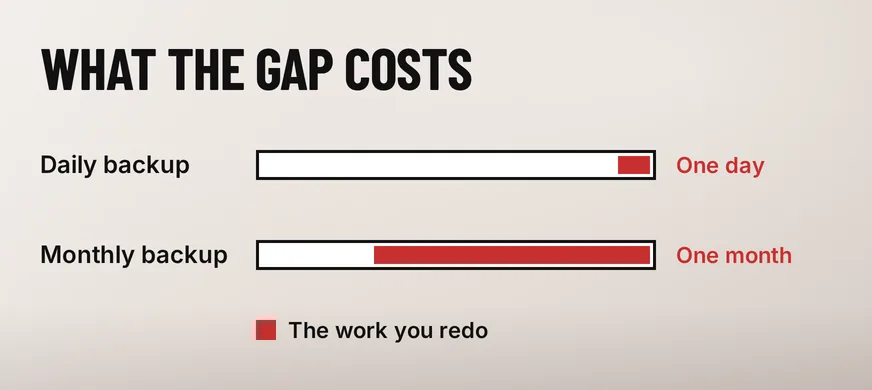
The work you redo is everything your site wrote down since the last copy. Choose how much of that you are willing to retype.
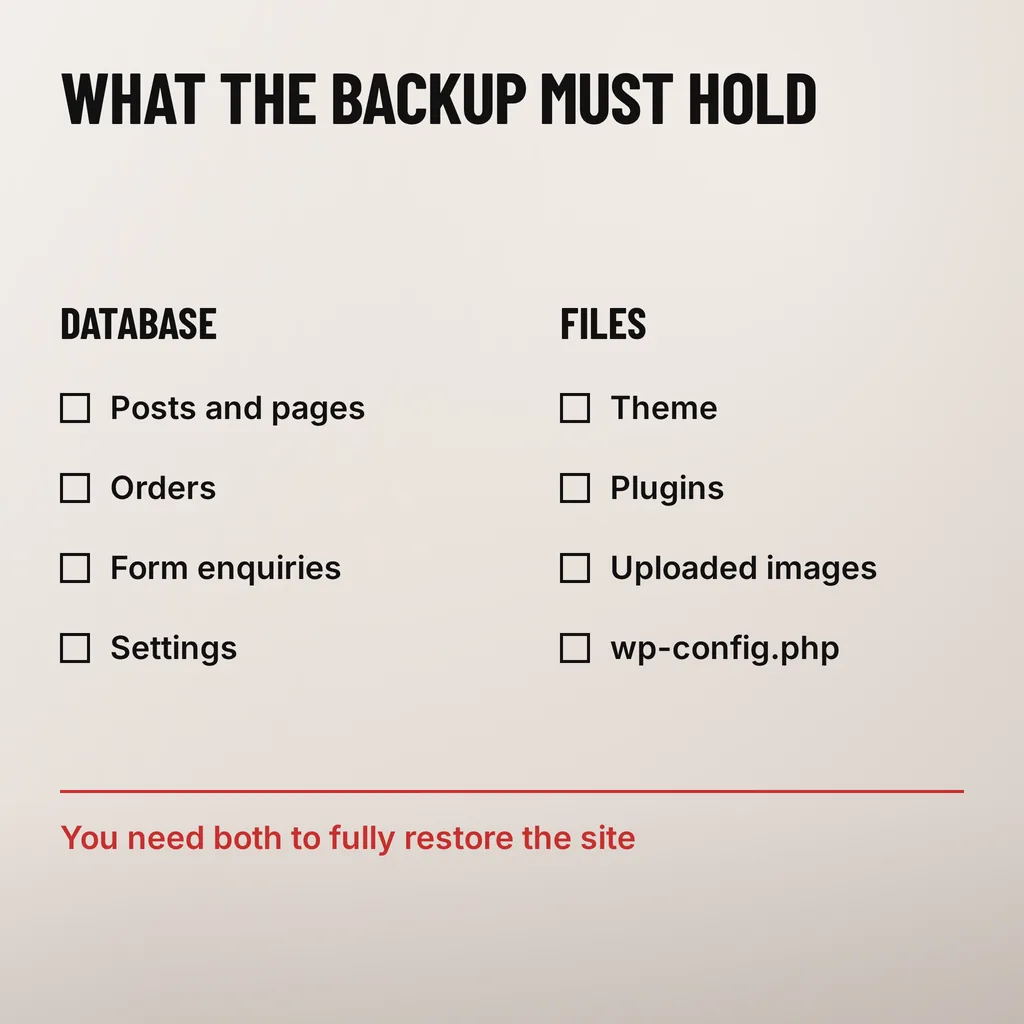
Two things, and a copy holding one of them is not a backup. WordPress’s documentation puts it in a sentence: “There are two parts to backing up your WordPress site: Database and Files”, and “You need both to be able to fully restore a typical WordPress site.”
Posts and pages, orders, form enquiries and settings live here, along with users, comments and most of what a page builder stores. It is the part that changes hourly and the part that cannot be rebuilt from anywhere else.
Theme, plugins, uploaded images and wp-config.php live on disk. These change rarely, which is why some plugins default to a database-only schedule, and why that default causes the worst restores: your orders come back into a site with no theme, no plugins and every image broken.
Check which one yours is doing. In most backup plugins the schedule screen lists the database and the files as separate toggles, often with different intervals. Daily database and weekly files is a sensible pairing; database-only is not a pairing at all.
Somewhere your hosting account cannot take down with it. A backup saved into a folder on the same server dies in the same disk failure, the same billing lapse and the same compromise as the site it came from.
That last one is not hypothetical. The UK National Cyber Security Centre’s principles for ransomware-resistant backups report that “in the early stages of a destructive ransomware attack, actors often target backups and infrastructure, deleting or destroying the data stored there to make it harder for the victim to recover their data, and more likely to pay the ransom.” A copy an attacker can reach with the credentials they already have is not a second copy.
The shape to aim for is the one CISA publishes as the 3-2-1 rule: three copies of the data, on two different kinds of storage, with one of them off-site. For a small business website that is less work than it sounds — the live site, an automatic copy to cloud storage the hosting account cannot reach, and a monthly download you keep yourself.
Keep more than the newest one. WordPress’s documentation recommends keeping “at least 3–5 recent WordPress backups to stay safe from data loss, with copies stored in different locations”. The reason is that some problems are quiet: a plugin that corrupts data slowly, or an intrusion nobody notices for a fortnight. If every copy you hold was taken after the damage, every copy you hold contains it.
Your host almost certainly keeps its own copies too, and they are worth having. They are not a plan on their own. The WordPress documentation is blunt about why: “Most hosts back up the entire server, including your site, but it takes time to request a copy of your site from their backups, and a speedy recovery is critical.” Knowing the difference between those copies and your own is part of what should be in place before the site goes down.
Probably not, and a restore nobody has tried is the step that decides whether the whole arrangement was worth paying for. A backup schedule that runs, a dashboard reading Success and a storage folder that keeps filling up all prove that something is being written. None of them proves it can be read back.
The NCSC makes the same point about its own principles: a compliant backup solution “will only be effective in practice if system owners regularly test and monitor the health of the backup data”. CISA’s guidance on backing up data goes further and tells organisations to test the restore procedure itself, so that data can be brought back both in full and in part. WordPress’s documentation asks for the same habit in smaller words: “it is highly recommended that you back up those auto backups with a manual backup once in a while to guarantee that the process is working.”
A restore test takes an hour and does not touch the live site. Restore the most recent copy onto a staging subdomain or a local copy, then look for five things: the homepage renders with its theme, images in older posts load, the newest order or enquiry is present, an admin login works, and the contact form sends. A restore that produces a readable site missing every image has told you something useful about your files schedule.
Do it once when the backup is set up, then once or twice a year, and after any change to hosting, backup plugin or storage destination. We have not measured how many Malaysian SME sites would fail that test. What we can say is that in the recovery work we are asked into, the copy is usually either missing or database-only, and nobody found out until the day it mattered.
None of this is a one-off task, which is why it belongs in routine upkeep rather than a to-do list — it sits alongside the updates, uptime checks and security work a website care plan should spell out.
Usually yes, and it is worth having. It is a server-level copy on a schedule you do not control, with a retention window you did not choose and a restore you have to request and wait for. WordPress’s documentation notes that requesting a copy from a host takes time while a speedy recovery is what you actually need. Treat the host copy as a second line and keep your own.
It is enough if it covers both the database and the files, sends the copies to storage outside the hosting account, keeps several of them, and you have restored one. A plugin writing nightly copies into a folder on the same server meets none of those conditions.
Long enough to reach back past a problem you did not notice immediately. Keeping three to five recent copies, spread across days rather than hours, covers the slow failures: a corrupting plugin, a bad edit found weeks later, an intrusion discovered in the next security check.
On a site we take over, the backup is one of the first things we check and one of the most common things we find broken — running, reporting success, and database-only. Setting it properly is a short job: the right frequency for what the site records, copies stored away from the hosting account, and one restore actually performed so the arrangement is known to work rather than assumed to. Our web development and design service includes that check on every site we build or revamp, and the next step is simply finding out when yours was last restored.