Too many pages on website title card with a flat illustration of a pale website page list almost buried under six small loose page cards scattered across it at angles, one of them carrying a scarlet bar

The pages that should go are the ones nobody visits, nobody links to and nobody in the business can explain. Finding them takes four exports and an afternoon. Removing them takes more care, because a page on a live website is also an address, and the address outlives the page: old links, saved bookmarks, printed flyers and search results all keep pointing at it after the page itself has gone.

Search the phrase “too many pages on website” and the answer that comes back is almost always crawl budget: the idea that Google cannot get round a site this size. Google’s own guidance says that is not your problem. The things that genuinely are get far less attention, and they cost a business more.

Too many pages on website: what does the count actually cost?

Crawl budget is the first answer anyone offers, and for a business website it is the wrong one. Google scopes its own crawl-budget guide to sites of a million pages or more changing about weekly, and to sites above ten thousand pages changing daily. Everyone else gets a plain instruction: if your pages seem to be crawled the same day that they are published, you don’t need to read this guide.

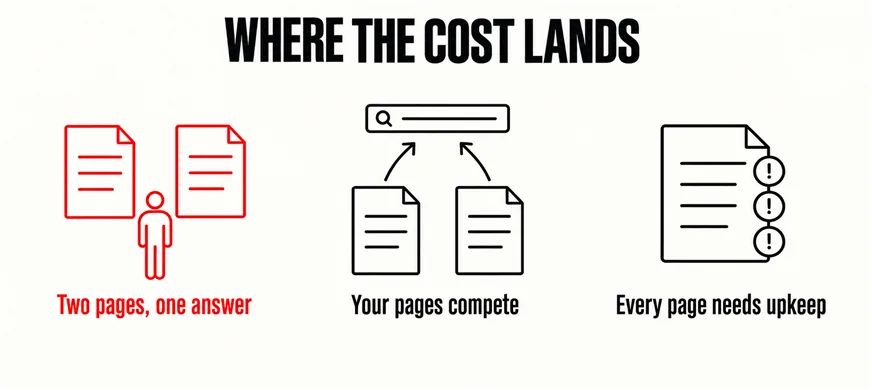
A two-hundred-page site with an unread half is not a crawling problem. It is three other problems, and all three are paid for in ringgit rather than impressions.

  • The visitor has to choose, and sometimes chooses wrong. Two service pages describing nearly the same thing, both accurate, written three years apart. Whoever lands on the weaker one judges the business on it, and nobody inside the company ever sees it happen.
  • Your own pages compete for the same search. When two or three of them cover one subject, the choice of which to show passes to Google, and it regularly lands on the oldest rather than the best. Nothing is penalised; the decision has simply left your hands.
  • Everything on the list has to be maintained. Every page is a form that can break, a price that can date, a number that stopped being yours. Four hundred pages is four hundred chances to be wrong in public, and the pages nobody reads are the pages nobody checks.

A fourth cost never appears on any report: nobody can say what the site contains, so improvements get argued about instead of made and every revamp quote arrives padded with the risk of pages nobody could account for. If the site is also failing on mobile, speed or accuracy, the page count is a symptom rather than the illness, and the wider diagnostic is the better place to start.

Google is not counting your pages. Your customers are choosing between them.
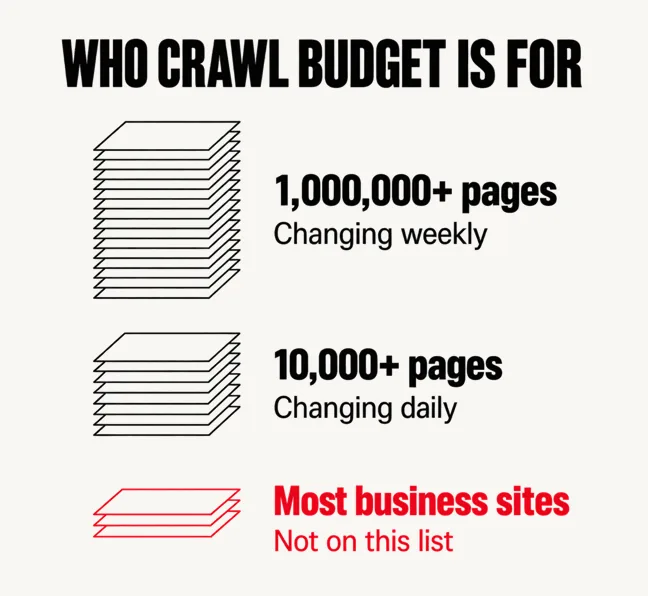
A labelled diagram headed WHO CRAWL BUDGET IS FOR with three line-art stacks of pages falling in height, the tallest marked 1,000,000+ pages changing weekly, the middle one marked 10,000+ pages changing daily, and a three-sheet stack drawn in scarlet marked Most business sites, Not on this list
A wide labelled diagram headed WHERE THE COST LANDS showing two identical page outlines with a small figure standing between them captioned Two pages, one answer in scarlet, then two pages with arrows converging on a single search bar captioned Your pages compete, then a page with three circled warning marks captioned Every page needs upkeep

Which pages are the dead weight?

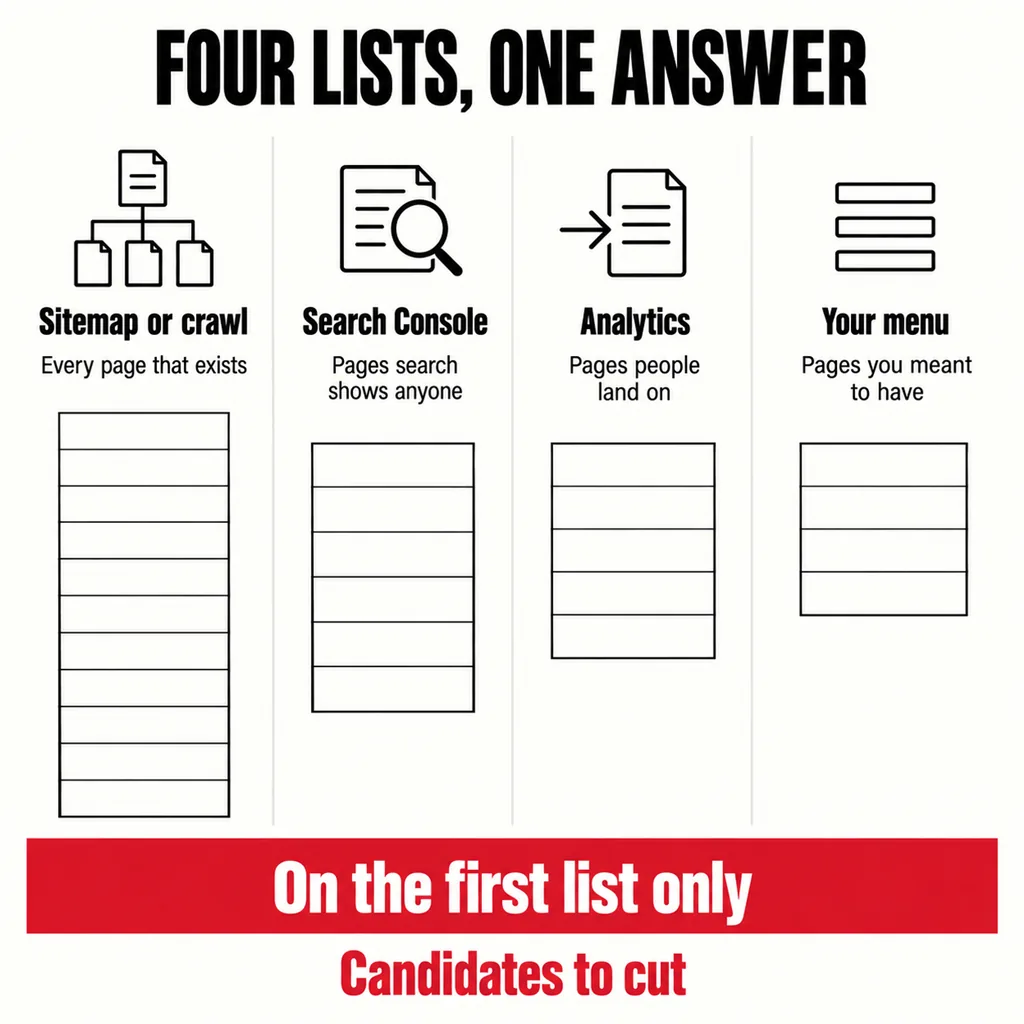
Do not start from memory, and do not start from the menu. Start from four lists, exported on the same afternoon so they describe the same site:

  • Everything that exists. Your XML sitemap, or a crawl if the sitemap has drifted from reality. One row per URL, nothing filtered out.
  • Everything search shows anyone. Search Console, Performance report, the last twelve months, grouped by page.
  • Everywhere people actually land. The landing-page report in your analytics, which catches what search does not: the profile link, the WhatsApp forward, the QR code on a flyer.
  • Everything you meant to have. Your own navigation, written out by hand. It is usually the shortest list by a distance.

A URL that appears on the first list and nowhere else is a candidate. It exists, search shows it to nobody, nothing sends anyone to it and your own menu does not offer it. Most sites over a few years old carry dozens.

Candidate is not verdict, so check the usual suspects against what they are actually for before anything goes:
  • Expired campaign and offer pages. The Raya promotion nobody took down, the open day, the bundle you discontinued. A dated offer still live is worse than no page, because sooner or later somebody asks for that price.
  • Location and variant pages built for search terms. Five pages for five towns with one paragraph changed between them, or one page per product size. If no two of them say anything genuinely different, they are one page wearing five addresses.
  • Pages nobody made. WordPress mints URLs on its own: tag archives holding one post, an author archive on a one-author site, an attachment page per image, paginated archives, internal search results. Sixty real pages can carry several hundred of these, and they are usually the bulk of an inflated count.
  • Leftovers from the last build. home-2, services-new, the staging copy nobody took down. Look here first: they duplicate pages that are still live, which is the one kind of spare page that works against the original.
  • Pages with one job a year. The document a bank or a tender asks for, your SSM and company details, the policy nobody reads until the day it matters. No traffic, high consequence. These stay.
A labelled square diagram headed FOUR LISTS, ONE ANSWER with four columns marked Sitemap or crawl, Search Console, Analytics and Your menu, each under a short caption, and a scarlet band across the foot reading On the first list only

Removing a page is a decision about its address

Deleting the page in WordPress takes a second. The decision that matters is what its address returns the morning afterwards, and there are four honest answers.

The Removals tool in Search Console is missing from that list on purpose. It is an emergency measure and a temporary one: requests made in the Removals tool last for about 6 months, after which the page returns unless one of the four decisions above was actually made.

Write the destination for every address before anything is deleted. That map is the same document a redesign runs on, and holding on to rankings through a redesign mostly comes down to whether somebody wrote it.

How to make the cut without frightening anyone

Two things turn a sensible cleanup into an argument: doing it in dribs over six months so nobody can tell what changed, and doing it to the wrong pages. Four rules prevent both.

  • Leave the top ten alone. Whatever earns clicks, enquiries or inbound links keeps its address, however dated it looks to you. Rewrite it if it deserves it; do not move it.
  • Do it as one release. One batch, one date, every redirect deployed together, and one row written per removed URL saying where it now points. Removals dribbled out over months cannot be attributed to anything afterwards, and somebody will ask within the year.
  • Watch the Pages report. Four weeks in Search Console afterwards, to confirm the removed URLs are leaving the index and that nothing you meant to keep has followed them out.
  • Judge it on first-party numbers. Clicks and enquiries from your own Search Console and your own inbox, not a third-party rank tracker. Those tools have their own bad weeks, and a fortnight of unreliable data is easy to mistake for damage you caused.

Done in this order the risk stays small, because the pages leaving were not the ones bringing anybody in. What changes is that the site becomes explainable again — a list somebody can read in one sitting.

Frequently asked questions

Is it better to delete a page or just add noindex?

It depends on whether anyone still needs the page. A noindex tag keeps it working for people you send the link to while taking it out of search results, which suits thank-you pages, hand-sent forms and reference material. Delete when nobody needs it at all, then decide where its address points.

Do I have to redirect every page I remove?

No. Redirect where another page genuinely takes over from the old one. Where nothing replaces it, letting the address return 404 or 410 is correct, and Google treats both as the content being gone. Redirecting everything to the homepage is the worse option: it wastes the visitor’s time and Google may read it as a soft 404 regardless.

How long before removed pages stop showing up in Google?

Usually weeks rather than days, depending on how often that URL was being crawled. Google drops a page from the index when it next requests it and finds it gone, so a rarely crawled one can linger for a while. That is normal, and not a sign that anything has gone wrong.

Where iRevamps fits

Nearly every site we are asked to revamp turns out to be two sites: the twenty or thirty pages the business actually runs on, and a long tail nobody has opened in years. Our website revamp and design service starts by separating the two, because the cost of a revamp is driven by how many pages have to be carried across, and a page that earns nothing should not be paid for twice. Send us the sitemap and a year of Search Console data and you will see that split before anyone talks about design.