- Resources
Innovative Thinking



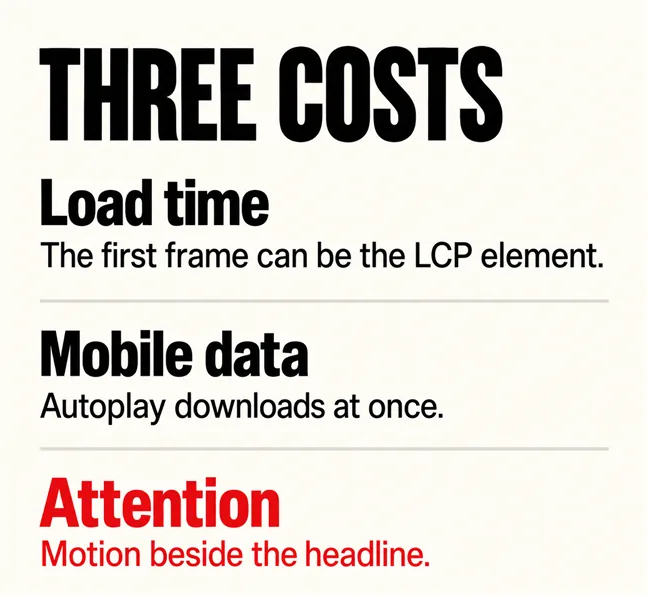
Usually not. A homepage video background is paid for three times on every visit: in load time, because the video can become the element the page is measured by; in the visitor’s mobile data, because an autoplaying video starts downloading at once; and in attention, because motion behind a headline competes with the headline. It earns its place only when the movement shows something a still photograph cannot, and even then it needs a poster image, a pause button and a still fallback for people who have asked their phone for less motion.
Most guides explain how to add one. This one asks whether yours should stay, and how to build it if it does.
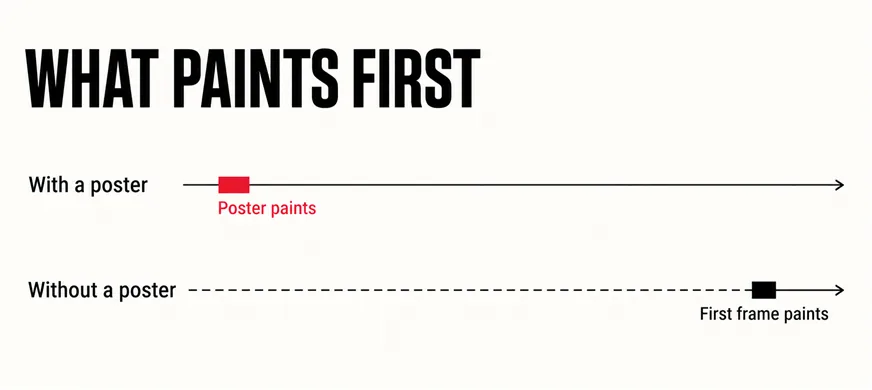
Load time. Google’s Largest Contentful Paint metric times the largest thing in the first screen, and web.dev’s explanation of Largest Contentful Paint lists video among the candidates: for a <video> element, “the poster image load time or first frame presentation time for videos is used—whichever is earlier”. A full-width hero video is almost always the largest thing on screen, so the first frame can be the LCP element. The same page sets the bar: “A good LCP value is 2.5 seconds or less.” With no poster, nothing there counts as painted until the video arrives. Whether three seconds is still fast enough covers the metric in full.
Mobile data. Autoplay downloads at once. The web.dev course on video performance gives the background video as one of the two everyday uses of autoplay, then warns that “<video> elements with the autoplay attribute specified begin downloading immediately, even if they are located outside of the initial viewport.” A visitor on a prepaid plan, on a mid-range phone, on 4G between meetings, pays for a looping clip of your office lobby before reading what you do.
Attention. Motion beside the headline pulls the eye from the one thing the first screen has to say. The same web.dev course is blunt about it: “Autoplay should only be used when necessary, and as the result of an anticipated need for the user.” A visitor checking whether you deliver to Johor did not anticipate a drone shot.
A hero video is the only part of the page that charges the visitor before it says anything.
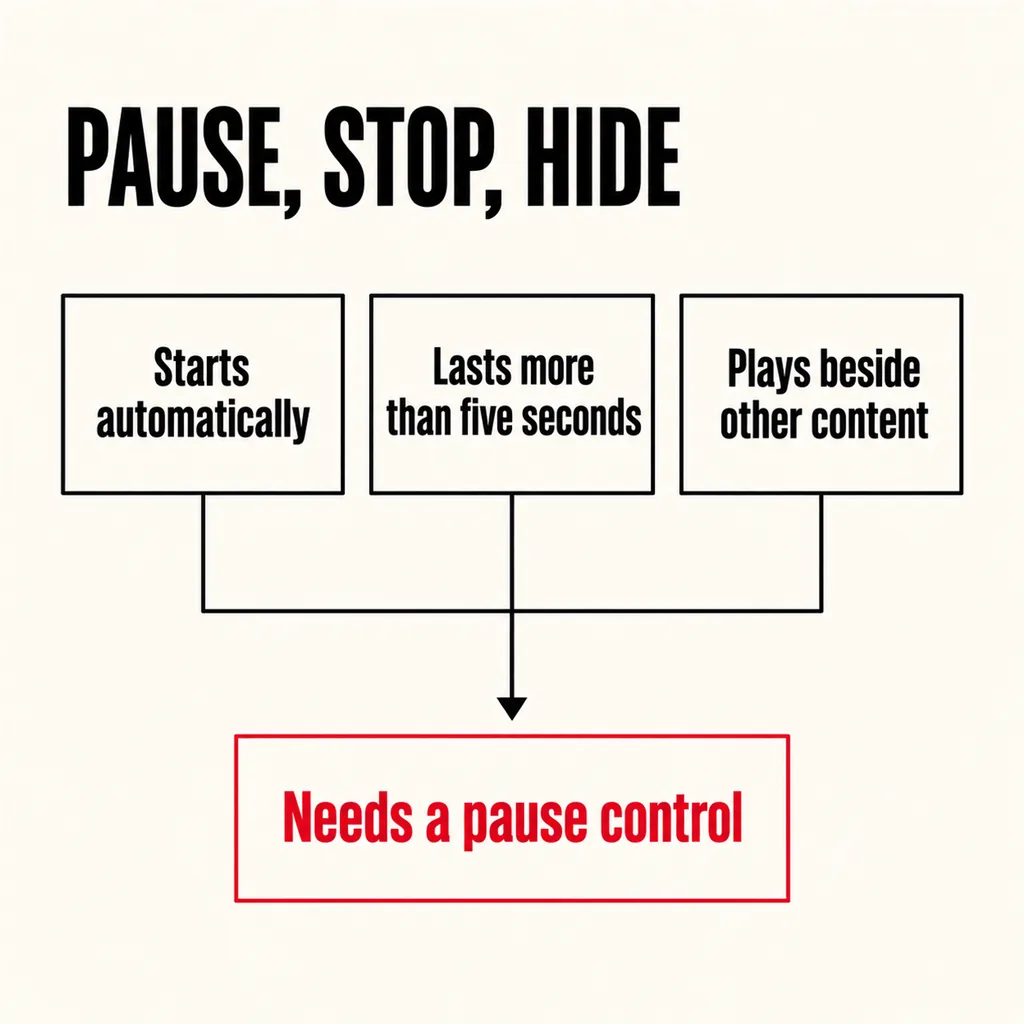
Yes, and this is the cost the how-to guides leave out. WCAG 2.2 Success Criterion 2.2.2, Pause, Stop, Hide, is Level A, the baseline. It reads: “For any moving, blinking or scrolling information that (1) starts automatically, (2) lasts more than five seconds, and (3) is presented in parallel with other content, there is a mechanism for the user to pause, stop, or hide it”, unless the movement is essential to the activity.
A looping background video meets every condition: it starts automatically, it lasts more than five seconds, and it plays beside other content, namely your headline and your button. So it needs a pause control. W3C’s explanation of the criterion gives the reason in a sentence: “Moving content can also be a severe distraction for some people.” It also closes the loophole of calling the video decorative: “all content on the web page (whether it is used to meet other success criteria or not) must meet this success criterion.”
The second obligation is courtesy rather than conformance. Phones and computers let people ask for less motion, and MDN’s reference for prefers-reduced-motion describes how a site can “detect if a user has enabled a setting on their device to minimize the amount of non-essential motion.” A background video is non-essential motion by definition. When that setting is on, show the poster and do not start the video. Can everyone who visits your website actually use it? covers the wider checks.
Sound is a separate question with a short answer: there should not be any. Browsers block most autoplay with audio anyway, and MDN’s autoplay guide notes that blocking “is not applied to <video> elements when the source media does not have an audio track, or if the audio track is muted.”
When the motion carries information a photograph cannot. Ask one question of the clip: if we froze its best frame, what would the visitor lose?
Then a second test, from the five-second homepage test: with the video playing, can someone outside the business say what you do? If the clip is the reason they cannot, it is costing more than load time. What visitors should see first sets out what the first screen is for, and autoplay video is on its list of things that do not belong there.
A clip that passes still has to be built so the three costs stay small:
| Decision | What it protects |
|---|---|
| A poster image: a compressed still of the best frame, set on the video | Load time: the poster can paint before the video does |
| A visible pause button, reachable by keyboard | WCAG 2.2.2, and anyone the motion distracts |
| Reduced motion on: show the poster, do not play | Visitors who asked their device for less motion |
No audio track, plus muted and playsinline | Autoplay actually working, and a smaller file |
| A short loop, cropped to what moves | Mobile data and decode time |
| Headline and button as real text, not burned into the video | Readability, search engines and translation |
Two decisions sit on top of the table. First, consider not playing the video on phones at all and showing the poster there, since phones are where the data is paid for and the screen is too small for motion to add much. Second, if the video comes from YouTube rather than your own server, the cost rises: the same web.dev course reports that “YouTube embeds block the main thread for more than 1.7 seconds for the median website.” Show a still with a play button that loads the player on tap.
Most of the time, a photograph. One honest, well-lit, properly compressed image of your work, premises or people does the video’s job and paints far sooner. Your photos are letting your website down covers what to shoot first.
If the motion genuinely matters, move it rather than delete it. A short clip lower on the page, behind a poster and a play button, costs nothing until someone chooses to watch, and the visitor who presses play is the one with “an anticipated need”. The first screen goes back to a headline, a line of proof and a button that says what happens next.
This is usually a revamp job rather than a rebuild: the page structure stays, the hero changes. Whether to revamp the site or fix the homepage and which design trends are worth using cover the same trade-off from either side, and whether your mobile site is actually easy to use is the test to run afterwards.
Not directly, and nothing guarantees a ranking either way. The indirect route is load time: if the video is the Largest Contentful Paint element and arrives late, the page fails a Core Web Vitals measure, and visitors leave before the headline appears.
Only if it stops within five seconds. WCAG 2.2.2 covers any automatic movement lasting longer beside other content, so a subtle endless loop still needs a pause control.
Yes, and it is often the best compromise. A large desktop screen gives the motion room to add something, and a fixed connection usually makes the data cost smaller. Keep the pause button and the reduced-motion check on desktop too.
When a hero video is on a site we revamp, we test it against the frozen-frame question before touching anything else, and most of the time the answer is a better photograph. When the motion is the evidence, our creative design service builds the clip properly: poster first, pause button, reduced-motion fallback and a file sized for a phone on 4G.