- Resources
Innovative Thinking


Not if the revamp only changes the website. Website revamp email failures come from one specific decision made along the way: moving the domain’s DNS, usually by pointing the nameservers at a new host, without carrying the mail records across. Redesign the site on the same server and your inbox never notices. Move the DNS and forget the mail records, and enquiries stop arriving while the new site looks perfect.
Below: how to tell which kind of revamp you are planning, the records to export before anything changes, how long the switch really takes, and the four tests that prove email survived.
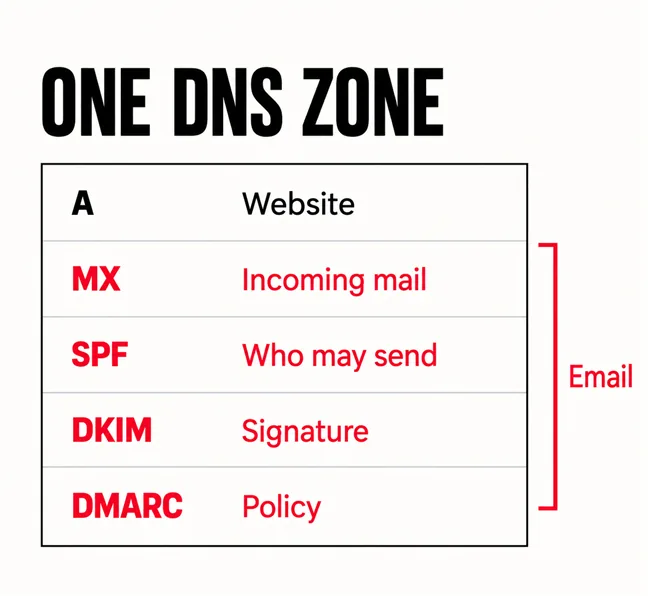
Because your website and your email are both directed by one file: the DNS zone for your domain. The A record says which server shows the website. Four other kinds of record run your email, and they sit in the same list.
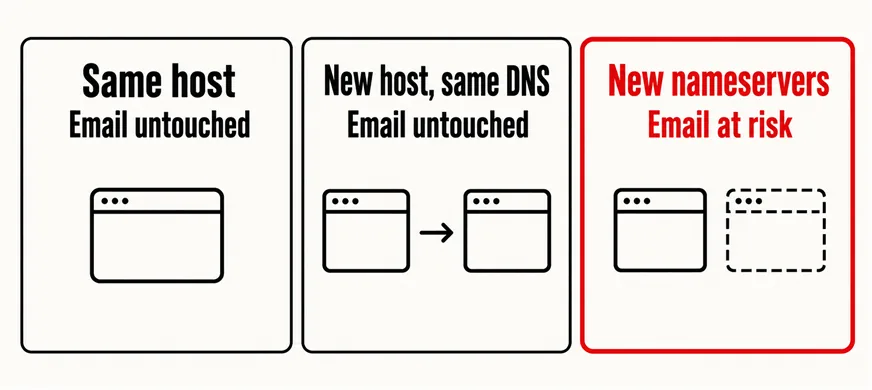
Whether a revamp touches any of these depends on which of three changes you are actually making. Same host: a new design on the existing server leaves the zone alone, and email is untouched. New host, same DNS: the zone stays at your registrar or DNS service and only the A record changes, so email is untouched unless your mailboxes lived on the old hosting account. New nameservers: the zone itself moves to the new host, and the new zone contains only what someone put in it.
That third case is where business email breaks. Many hosts create a fresh zone with their own defaults, including an MX record pointing at their own mail server. Switch the nameservers and the world starts reading that zone instead of yours. Mail to your real provider stops, and nobody gets an error message, because the mail is being delivered — just somewhere you never look.
Email does not break because the website changed. It breaks because the list of records was replaced and nobody copied it.
On Malaysian shared hosting there is a second trap: the website and every mailbox often sit in one cPanel account, so cancelling the old plan deletes the mailboxes. Moving your website to a new host covers the hosting side; this is the email side of the same change.
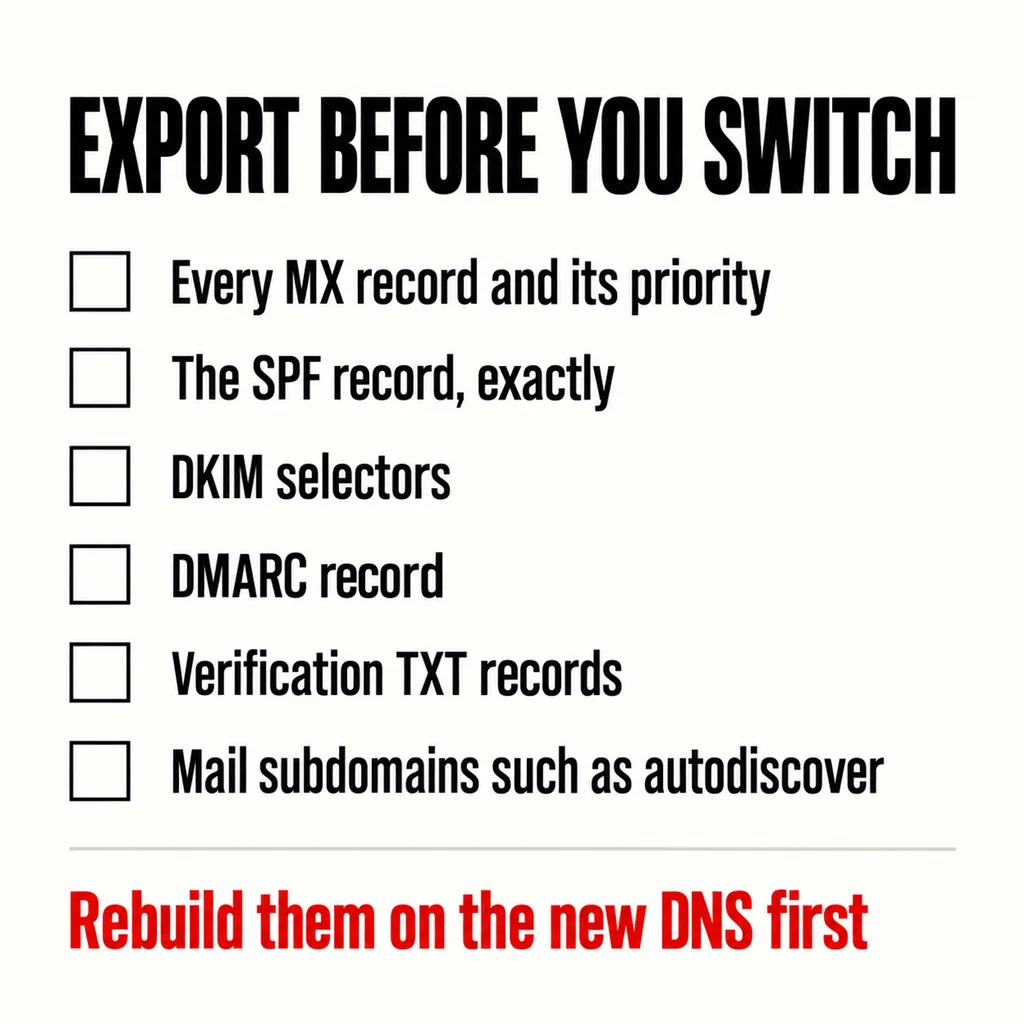
The whole zone, not the records you think matter. Most control panels export it as a text file. Save a copy outside both providers, then check it line by line:
Then build all of it in the new zone before switching the nameservers. Most providers let you edit a zone that is not yet live. Delete the host’s default MX while you are there, unless your mail really is moving to that host. Google’s Workspace setup page says it plainly: “Remove any other MX records.” and “Your email might not work correctly if you keep old or incorrect MX records.”
Find out, too, who holds the domain login. For many .com.my domains it is a previous developer’s reseller account, and the revamp is the week you discover you cannot reach it. Our revamp checklist puts that question first for this reason, and what to keep from the old website applies to records as much as pages.
Every DNS answer carries a time-to-live: how long other servers may reuse it before asking again. Until the old answer expires, some senders still see the old zone. If the old and new zones agree on the mail records, nobody can tell the difference. If they disagree, mail splits between two destinations for as long as the caches last.
So the move is safe when the new zone is complete before the switch, and the timing is mostly out of your hands. Google warns that it can take up to 72 hours for new MX records to be recognized. Microsoft’s setup tables give its records a TTL of 3,600 seconds, and its documentation notes that “Exchange Online only supports TTL values less than 6 hours (21,600 seconds)”. A nameserver change carries its own TTL too, set by the registry for .my or .com rather than by you, and no control panel can shorten it.
That gives three practical rules. Lower the TTL on the records you will change a few days in advance, as revamping without taking the site offline explains for the website side. Do not move email providers in the same weekend as the website; Microsoft’s instruction is to add users before updating an MX record for Microsoft 365 to ensure that email continues to work without interruption, which is a project in itself. And keep the old mail host running for at least a week after, because “any existing email stays at your previous email host” until it is migrated.
Because the website is also an email sender, and the new server has not been authorised to send as you. A WordPress contact form usually sends its notification from the web server itself. Move the site and that sending address changes; if your SPF record still lists the old server, receiving mail systems see an unauthorised sender using your domain.
Since February 2024, Gmail’s email sender guidelines have told every sender to “Set up SPF or DKIM email authentication for your sending domains”, and warn that messages failing this “might be marked as spam or rejected with a 5.7.26 error.” Your own enquiry notifications are messages like any other.
The tidy fix is to stop the web server sending mail at all: send form notifications through your mail provider with an SMTP plugin, so they are signed like ordinary mail. If the server must send, add it to the existing SPF record rather than creating a second one. The SPF standard, RFC 7208, states that “A domain name MUST NOT have multiple records” that a check would select, and caps the DNS lookups an SPF record may trigger at ten, beyond which the result is “permerror”. Each include: you add for a new host or plugin uses some of those ten. What happens to the enquiry once it does arrive is covered in what happens after someone submits your contact form.
Four tests, run on the day of the switch and again three days later, inside Google’s 72-hour window:
| Test | How | A pass looks like |
|---|---|---|
| Incoming mail | Send from a personal Gmail or Outlook account to each important mailbox, including info@ | Every message arrives in the right inbox |
| Outgoing mail | Reply to that message, then open it in Gmail with “Show original” | SPF, DKIM and DMARC all read PASS |
| Website form | Submit the real contact form with a real enquiry | The notification arrives, not in spam |
| Published records | Check the domain in Google Admin Toolbox Check MX | Only your provider’s MX, one SPF record |
Send each test from outside the company. Mail between colleagues can stay inside one system and proves nothing. If DMARC is not set up yet, add one once the tests pass; Gmail requires it only of senders sending more than 5,000 messages a day to Gmail accounts, and even then says the policy “can be set to none”, which monitors without blocking anything.
Put the four tests on the launch checklist and on the care plan for any month the DNS changes. If enquiries still look thin afterwards, why a site gets visitors but no enquiries covers the causes that are not email, and what to have in place when the site goes down covers the rollback.
Not because of the DNS change. Changing MX records only redirects new mail. You lose old mail when the mailboxes lived on the old hosting account and that account is cancelled, so download or migrate them before the plan ends.
If the new zone holds the same mail records before the nameservers change, there is no gap at all, because both zones give the same answer. Downtime is the result of a missing record, not of the move itself.
Yes, by editing only the A record, or the record that points the website, at the DNS host you already use. Ask which record will change before the work starts. If the answer is “the nameservers”, ask who will copy the mail records.
Before we touch a client’s DNS we export the zone, find where the mail actually lives and decide whether the nameservers need to move at all. Usually they do not. Our web development and design service treats email as part of every revamp, and runs the four tests above before calling a switch finished.